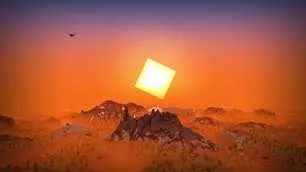
碎冰纹(Stracciatella)
这是一款极为轻量化的原生风格光影,带有彩色灯光效果。它专注于添加一些与原生风格相得益彰的出色特性。其可配置性极高,能让你打造属于自己的原生游戏体验。
特性亮点
彩色照明
碎冰纹为《我的世界》添加了多光源彩色照明,且性能卓越。发光方块不仅明亮闪耀,还能为环境增添色彩与光影效果。
美丽的远景迷雾
主世界和下界拥有高度优化的类似体积雾的效果,与“遥远地平线”搭配时尤为美观,例如基于高度的动态雾,以及在地形上蔓延的浓密雾团。
诸多细节优化
碎冰纹包含许多细微却重要的视觉改进和实用特性,提升了《我的世界》的外观,如雨滴折射、水坑、流星等等,还有更多!
可配置性
打造专属光影!碎冰纹让你掌控一切。所有效果都高度可定制,你可以随心所欲地调整出自己喜欢的外观。
完整特性列表
雾与天空
- 雾 - 关闭、边界、自动、高级
边界:
简单,与原生类似
自动:
当安装“遥远地平线”时启用“高级”雾
高级:
边界雾以及可配置的指数距离和基于高度的雾 - 高级雾
- 全局雾密度
应用于指数雾的恒定雾密度
主世界、下界和末地的密度相对于此值 - 主世界雾密度
主世界恒定雾的密度
相对于“全局密度” - 主世界噪声雾
- 主世界
- 高度比例乘数
应用于计算高度雾的比例因子的乘数
值越高,密度衰减越剧烈 - 高度密度乘数
应用于根据世界高度计算出的密度的乘数 - 动态密度起始高度
在选定的世界高度之后,雾密度随玩家高度开始增加
设置为默认值时,此作为校正因子以保持雾密度(视觉上)恒定 - 动态密度乘数
控制玩家高度对雾密度的影响程度 - 各向异性日落雾
日落和日出时,雾密度在太阳方向增加得更多 - 日落雾各向异性
各向异性程度 - 日落雾乘数
控制日落和日出期间雾的变化程度 - 风速
- 噪声雾比例
- 噪声雾渐变
- 噪声雾密度乘数
- 高度比例乘数
- 下界雾密度
下界恒定雾的密度
相对于“全局密度” - 下界噪声雾
- 下界
- 风速
- 噪声雾比例
- 噪声雾渐变
- 近雾密度乘数
- 末地雾密度
末地恒定雾的密度
相对于“全局密度” - 末地
- 全局雾密度
- 雾起始点
设置雾开始出现的位置
相对于渲染距离 - 雾终点
设置雾达到最大值的位置
相对于渲染距离 - 洞穴雾与天空
- 洞穴雾
当你在地下时,雾会变为不同颜色 - 洞穴天空
当你在地下时,天空会变为不同颜色 - 洞穴天空高度阈值
控制天空颜色改变所需的世界高度 - 洞穴雾 (RGB 颜色选择器)
洞穴内雾的颜色
- 洞穴雾
- 太阳与月亮
- 改变太阳和月亮大小
- 太阳和月亮大小
改变太阳和月亮的尺寸 - 太阳角度
倾斜太阳和月亮的旋转轴
原生为 0 - 在地平线以下隐藏
太阳和月亮开始在地平线以下消失 - 过渡高度
较低:太阳和月亮出现位置较低
较高:太阳和月亮出现位置较高 - 过渡
较低:过渡时间较长
较高:过渡时间较短
- 星星
- 原生星星亮度
- 自定义星星
- 大小
- 密度
- 覆盖范围
- 发光半径
- 发光量
- 流星
仅在启用“自定义星星”时生效 - 方向
- 密度
- 速度
- 尾迹长度
- 尾迹厚度
- 自定义天空颜色
- 天空颜色配置
- 自定义日落
- 天空日落 (RGB 颜色选择器)
- 天空白天 (RGB 颜色选择器)
- 天空白天雨天 (RGB 颜色选择器)
- 夜空亮度
- 天空夜晚 (RGB 颜色选择器)
- 天空夜晚雨天 (RGB 颜色选择器)
- 自定义雾颜色
- 雾颜色配置
- 白天雾 (RGB 颜色选择器)
- 白天雨雾 (RGB 颜色选择器)
- 夜晚雾亮度
- 夜晚雾 (RGB 颜色选择器)
- 夜晚雨雾 (RGB 颜色选择器)
- 末地天空
- 末地天空上部 (RGB 颜色选择器)
- 末地天空下部 (RGB 颜色选择器)
照明
- 光照图 - 简单、默认
默认:
所有特性
简单:
减少特性(仅“自适应方块光减少”和“最小亮度”) - 光照图设置
- 天空光环境光遮蔽
指定天空光的环境光遮蔽量 - 方块光环境光遮蔽
指定方块光的环境光遮蔽量 - 天空光伽马值
值越高 = 越暗
值越低 = 越亮 - 方块光伽马值
值越高 = 越暗
值越低 = 越亮 - 最小亮度
限制方块光永不低于此值
防止洞穴漆黑一片(除非你将其设置为零)
- 天空光环境光遮蔽
- 光照图颜色
- 自适应方块光减少
当天空明亮时减少方块光以避免裁剪
如果白天方块光太亮,增加此滑块值 - 下界环境亮度
- 末地环境光
- 末地环境亮度
- 末地环境饱和度
- 天空光白天 (RGB 颜色选择器)
- 天空光夜晚 (RGB 颜色选择器)
- 方块光 (RGB 颜色选择器)
选择方块光颜色(火把、萤石等)
如果启用“复杂方块光”,此颜色将 不 被使用 - 复杂方块光
允许你为方块光选择两种颜色
一种用于暗部,一种用于亮部 - 混合曲线
值越高:强调“亮”颜色
值越低:强调“暗”颜色
50 = 线性过渡 - 复杂方块光暗部 (RGB 颜色选择器)
- 复杂方块光亮部 (RGB 颜色选择器)
- 自适应方块光减少
- 彩色灯光
启用方块上的彩色照明 - 彩色灯光设置
- 鲜艳度
- 累积拒绝 - 低、默认、高
设置如何丢弃时间历史信息
值越高,历史信息越容易被丢弃 - 累积混合因子
设置时间历史信息如何与新信息合并
值越低,对历史信息的依赖越小,颜色更新更快,但代价是闪烁更多 - 闪烁减少
如果你遇到频繁的颜色闪烁出现,增加此滑块值
值越高,新颜色传播和出现的速度越慢 - 累积再生速度
设置空区域(无颜色信息)被填充的速度
值高会使颜色最初出现得更快,但可能在遮挡区域引入闪烁 - 采样细节层次偏差
控制颜色采样的细节级别
值越高,颜色越平滑,但可能会跳过小光源
值越低,采样细节更高,但会降低平滑度并引入闪烁
光影会尽力自行计算合适的细节层次
- 方向光照图
- 方向光照图强度
- 法线 - 生成、纹理
- 法线分辨率乘数
自动生成的法线分辨率可能与你的资源包不同
此滑块允许你为法线选择更高的分辨率
不影响性能 - HDR 自发光
- HDR 自发光亮度
天气
- 降雨检测 - 温度、颜色
光影检测降雨的方式
“颜色”通常是更好的选择
如果出现以下情况选择“温度”:
降雨未获得降雨效果
非降雨的事物获得降雨效果 - 降雨不透明度
- 雨滴折射 - 关闭、快速、精美
- 雨滴折射强度
- 倾斜降雨
- 倾斜降雨程度
- 倾斜降雨旋转速度
- 雨水坑洼
- 雨水坑洼颜色
- 雨水坑洼 (RGB 颜色选择器)
- 雨水坑洼覆盖范围
- 雨水坑洼大小
- 雨水坑洼不透明度
- 雨水坑洼视差
- 视差折射
- 视差深度
摆动方块
- 摆动方块
- 摆动方块数量
- 摆动方块速度
- 摆动树叶
- 摆动睡莲
由“摆动液体数量”和“摆动液体速度”控制 - 摆动灯笼
- 摆动火焰
- 摆动液体
水和熔岩 - 摆动液体数量
- 摆动液体速度
相机与颜色
- FXAA
启用抗锯齿
提升边缘质量 - 高质量放大
切换到双三次采样
内部启用 FXAA
在较低渲染质量设置下可能有用 - 对比度
- 鲜艳度
- 饱和度
- 亮度
- 晕影 - 关闭、圆形、方形
使屏幕边缘变暗 - 晕影强度
- LUT
将自定义颜色查找表应用于图像
仅适用于 Optifine G8 及更高版本!
如何添加查找表:
解压 .zip 文件
进入:shaders/lut
将查找表放入此文件夹并命名为“lut[数字].png”
然后你可以使用滑块选择文件
以此方式最多可加载 6 个查找表 - 选定的 LUT
光影自带的默认查找表为:
lut0.png:中性
lut1.png:天陨
lut2.png:夏夜冒险
lut3.png:铬黄
lut4.png:海军上将动漫 LUT
lut5.png:绿 -> 红颜色交换(红外) - 使用对数颜色
- LUT 单元格大小
一侧的单元格数量
通过计算查找表图像一侧的方块数量得出
水
- 水下雾密度
- 深度影响
值越高:深度对雾密度影响越大
值越低:深度对雾密度影响越小
零:深度对雾密度无影响 - 雾亮度影响
值越高:水下雾在夜间会更暗 - 雾亮度影响
值越高:潜水越深,水下雾变暗越快
实用工具与效果
- 闪烁矿石
- 闪烁矿石设置
- 闪烁亮度
- 钻石
- 远古残骸
- 铁
- 金
- 铜
- 红石
- 青金石
- 绿宝石
- 煤炭
- 下界石英
- 下界金矿石
- 伤害效果
- 伤害效果红色程度
- 伤害效果位移
- 伤害效果单元格大小
- 速度效果
快速移动时添加拖影 - 速度效果强度
- 速度效果拖影长度
其他
- 遥远地平线
- 地形淡入淡出
平滑地淡化《我的世界》地形,减少遥远地平线地形与《我的世界》地形之间的过渡突兀感 - 丢弃遥远地平线地形
- 地形丢弃容差
- 丢弃遥远地平线透明方块的区块
- 透明方块丢弃容差
- 地形淡入淡出
- 抖动 - 无、智能、完全
消除色带
智能:在选定程序中启用抖动
完全:在所有程序中启用抖动 - 时间模式 - 实时、世界时间、帧数
设置光影用于确定时间的方法
时间用于驱动动画,例如摆动的树叶和水
实时:
使用实际时间
世界时间:
使用游戏内时间
这对像 Replaymod 这样的动画工具可能有用
帧数:
基于固定帧率使用帧数
这对像 Replaymod 这样的动画工具可能有用 - 时间模式帧率
选择“时间模式:帧数”时用于计算时间的帧率 - 固体方块轮廓
- 线条粗细
应用于所有线条,例如方块轮廓和碰撞箱
仅从 1.17 版本及更高版本起生效
在 Iris 上Stracciatella
A very lightweight vanilla style shader with colored lights. Focuses on adding some nice features that go hand in hand with vanilla. It is highly configurable and lets you craft your own personal vanilla experience.
Feature Highlights
Colored Lighting
Stracciatella adds multi-lightsource colored lighting to Minecraft with excellent performance. Light emitting blocks glow bright and tint and shade the environment.
Beautiful Distance Fog
The Overworld and the Nether have highly optimized volumetric-like fog effects that look especially beautiful with Distant Horizons, such as dynamic fog based on height aswell as patches of dense fog that sweep the landscape.
Many Bells and Whistles
Stracciatella is packed with many subtle but important visual improvements and quality of life features that improve Minecraft's look, such as rain refraction, puddles, shooting stars and much, much more!
Configurable
Make it yours! Stracciatella puts you in the driver's seat. All of Stracciatellas effects are highly customisable, so you can dial in the look exactly as you like it.
Full Feature List
Fog and Sky
- Fog - OFF, Border, Auto, Advanced
Border:
Simple, comparable to vanilla
Auto:
Enables "Advanced" fog when Distant Horizons is present
Advanced:
Border fog aswell as configurable exponential distance and height based fog - Advanced Fog
- Global Fog Density
Constant fog density applied to exponential fog
Overworld, Nether and End densities are relative to this value - Overworld Fog Density
Density of constant Overworld fog
Relative to "Global Density" - Overworld Noise Fog
- Overworld
- Height Scale Multiplier
Multiplier applied to the scale factor used to calculate height fog
Higher values correspond to a harsher density falloff - Height Density Multiplier
Multiplier applied to the density calculated from world height - Dynamic Density Start Height
Fog density starts to increase with player height after the selected world height
Set to the default value, this acts as a correctional factor to keep the fog density (visually) constant - Dynamic Density Multiplier
Controls how much player height influences fog density - Anisotropic Sunset Fog
Fog density at sunset and sunrise increases more in direction of the sun - Sunset Fog Anisotropy
Amount of Anisotropy - Sunset Fog Multiplier
Controls how much the fog changes during sunset and sunrise - Wind Speed
- Noise Fog Scale
- Noise Fog Fade
- Noise Fog Density Multiplier
- Height Scale Multiplier
- Nether Fog Density
Density of constant Nether fog
Relative to "Global Density" - Nether Noise Fog
- Nether
- Wind Speed
- Noise Fog Scale
- Noise Fog Fade
- Near Fog Density Multiplier
- End Fog Density
Density of constant End fog
Relative to "Global Density" - End
- Global Fog Density
- Fog Start
Sets where the fog starts appearing
Relative to render distance - Fog End
Sets where the fog reaches its maximum
Relative to render distance - Cave Fog and Sky
- Cave Fog
Fog changes to a different color when you are underground - Cave Sky
Sky changes to a different color when you are underground - Cave Sky Height Threshold
Controls which world height is necessary for the sky color to change - Cave Fog (RGB Color Picker)
Color of fog inside of caves
- Cave Fog
- Sun and Moon
- Change Sun and Moon Size
- Sun and Moon Size
Changes the size of sun and moon - Sun Angle
Tilts the rotation axis of sun and moon
Vanilla is 0 - Hide under Horizon
Sun and moon start disappearing under the horizon - Transition Height
Lower: sun and moon appear lower
Higher: sun and moon appear higher - Transition
Lower: Longer transition
Higher: Shorter transition
- Stars
- Vanilla Star Brightness
- Custom Stars
- Size
- Density
- Coverage
- Glow Radius
- Glow Amount
- Shooting Stars
Only works with "Custom Stars" enabled - Direction
- Density
- Speed
- Trail Length
- Trail Thickness
- Custom Sky Color
- Sky Color Configuration
- Custom Sunset
- Sky Sunset (RGB Color Picker)
- Sky Day (RGB Color Picker)
- Sky Day Rain (RGB Color Picker)
- Night Sky Brightness
- Sky Night (RGB Color Picker)
- Sky Night Rain (RGB Color Picker)
- Custom Fog Color
- Fog Color Configuration
- Fog Day (RGB Color Picker)
- Fog Day Rain (RGB Color Picker)
- Night Fog Brightness
- Fog Night (RGB Color Picker)
- Fog Night Rain (RGB Color Picker)
- End Sky
- End Sky Upper (RGB Color Picker)
- End Sky Lower (RGB Color Picker)
Lighting
- Lightmap - Simple, Default
Default:
All Features
Simple:
Reduced features (only "Adaptive Blocklight Reduction" and "Minimum Light") - Lightmap Settings
- Skylight AO
Specifies the amount of ambient occlusion on skylight - Blocklight AO
Specifies the amount of ambient occlusion on blocklight - Skylight Gamma
Higher = Darker
Lower = Brighter - Blocklight Gamma
Higher = Darker
Lower = Brighter - Minimum Light
Restricts blocklight to never go below this value
Prevents caves from being pitch black (unless you set it to zero that is)
- Skylight AO
- Lightmap Colors
- Adaptive Blocklight Reduction
Reduces blocklight when the sky is bright to avoid clipping
If the blocklight is too bright during daytime, increase this slider - Nether Ambient Brightness
- End Ambient Light
- End Ambient Brightness
- End Ambient Saturation
- Skylight Day (RGB Color Picker)
- Skylight Night (RGB Color Picker)
- Blocklight (RGB Color Picker)
Select blocklight color (torches, glowstone, etc.)
If "Complex Blocklight" is enabled, this color will NOT be used - Complex Blocklight
Allows you to select two colors for blocklight
One for dark parts, one for bright parts - Blend Curve
Higher: Emphasize "Bright" color
Lower: Emphasize "Dark" color
50 = linear transition - Complex Blocklight Dark (RGB Color Picker)
- Complex Blocklight Bright (RGB Color Picker)
- Adaptive Blocklight Reduction
- Colored Lights
Enabled colored lighting on blocks - Colored Light Settings
- Vibrance
- Accumulation Rejection - Low, Default, High
Sets how temporal history information is discarded
Higher corresponds to history being discarded more easily - Acc. Blend Factor
Sets how temporal history information is merged with new information
A lower value places less emphasis on history and will cause colors to update faster at the cost of more flicker - Flicker Reduction
Increase this slider if you experience frequent spots of color blinking into existence
Higher values will decrease the speed at which new color spreads and appears - Acc. Regeneration Speed
Sets how fast empty regions (with no color information) are filled up
A high value will cause colors to appear faster initially, but may introduce flicker in disoccluded regions - Sample LOD Bias
Controls the detail level at which colors are sampled
A higher value will make colors smoother but may cause small lights to be skipped
A lower value will sample at higher detail but will decrease smoothness and introduce flicker
The shader does its best to calculate the appropriate LOD itself
- Directional Lightmaps
- Directional Lightmap Strength
- Normals - Generated, Texture
- Normals Resolution Multiplier
Auto-Generated Normals may have a different resolution than your resource pack
This slider allows you to select a higher resolution for the normals
No performance impact - HDR Emissives
- HDR Emissive Brightness
Weather
- Rain Detection - Temperature, Color
How the shader detects if rain is present
"Color" is generally the better option
Select "Temperature" if:
Rain does not receive rain effects
Things that are not rain receive rain effects - Rain Opacity
- Rain Refraction - OFF, Fast, Fancy
- Rain Refraction Strength
- Angled Downfall
- Angled Downfall Amount
- Angled Downfall Rotation Speed
- Rain Puddles
- Rain Puddle Color
- Rain Puddle (RGB Color Picker)
- Rain Puddle Coverage
- Rain Puddle Size
- Rain Puddle Opacity
- Rain Puddle Parallax
- Parallax Refraction
- Parallax Depth
Waving Blocks
- Waving Blocks
- Waving Blocks Amount
- Waving Blocks Speed
- Waving Leaves
- Waving Lilypads
Controlled by "Waving Liquids Amount" and "Waving Liquids Speed" - Waving Lanterns
- Waving Fire
- Waving Liquids
Water and Lava - Waving Liquids Amount
- Waving Liquids Speed
Camera and Color
- FXAA
Enables Anti-Aliasing
Improves quality of edges - High Quality Upscaling
Switches to bicubic sampling
Internally enables FXAA
Can be useful with lower render quality settings - Contrast
- Vibrance
- Saturation
- Brightness
- Vignette - OFF, Round, Square
Darkens screen borders - Vignette Strength
- LUT
Applies a custom color LUT to the image
Only works for Optifine G8 and higher!
How to add your luts:
Extract the .zip
Go to: shaders/lut
Put your LUT in this folder and name it "lut[number].png"
You can then select the file using the slider
Up to 6 luts can be loaded this way - Selected LUT
Default LUTs shipped with the shader are:
lut0.png: Neutral
lut1.png: Skyfall
lut2.png: A Summer Night's Adventure
lut3.png: Chrome
lut4.png: Admiral's Anime LUT
lut5.png: Green->Red Color swap (Infrared) - Use LOG Color
- LUT Cell Size
Amount of cells on one side
Count the squares on the lut image along one side to figure this out
Water
- Underwater Fog Density
- Depth Influence
Higher: Depth will have a strong influence on fog density
Lower: Depth will have a weak influence on fog density
Zero: Depth will have no influence on fog density - Fog Brightness Influence
Higher: Underwater fog will be darker at night - Fog Brightness Influence
Higher: Underwater fog will get darker faster when you dive deeper
Utilities and Effects
- Blinking Ores
- Blinking Ores Settings
- Blink Brightness
- Diamond
- Ancient Debris
- Iron
- Gold
- Copper
- Redstone
- Lapis Lazuli
- Emerald
- Coal
- Nether Quartz
- Nether Gold
- Damage Effect
- Damage Effect Redness
- Damage Effect Displacement
- Damage Effect Cell Size
- Speed Effect
Adds streaks when moving fast - Speed Effect Strength
- Speed Effect Streak Length
Other
- Distant Horizons
- Fade Terrain
Smoothly fades out Minecraft terrain, reducing the transition between Distant Horizons' terrain and Minecraft's terrain - Discard DH Terrain
- Terrain Discard Tolerance
- Chunk Discard DH Transparents
- Transparents Discard Tolerance
- Fade Terrain
- Dithering - None, Smart, Full
Removes Banding
Smart: Enables dithering in select programs
Full: Enables dithering in all programs - Time Mode - Realtime, Worldtime, Framecount
Sets which method the shader uses to determine the time
Time is used for driving animations, for example waving leaves and water
Realtime:
Uses the actual time
Worldtime:
Uses the ingame time
This can be useful for animation tools like replaymod
Framecount:
Uses the frame count based on a fixed framerate
This can be useful for animation tools like replaymod - Time Mode Framerate
Framerate used for calculating the time when "Time Mode: Framecount" is selected - Solid Block Outline
- Line Thickness
Applies to all lines, for example block outline and hit boxes
Only works from versions 1.17 and onwards
Doesn't work on Iris - Block Outline Style - Black, White, Rainbow, Custom Color
- Custom Color Configuration
- Block Outline (RGB Color Picker)
- Aggressive Optimization - OFF, On, Unsafe
Activates Optimizations that can break some visuals or might break in future versions of Minecraft
Agreement
You are allowed to
- Use my shaderpack in your videos / screenshots
You are not allowed to
- Redistribute my shaderpack: If you want to provide a download link you must link to my Modrinth / Curseforge page
- Use monetized URL shorteners linking to downloads of my shaderpack
- Publish edits of my shaderpack without my permission
- Fog - OFF, Border, Auto, Advanced
本站是资源分享站,资源均来自于互联网和用户自发分享,仅供学习和交流使用。如有版权问题,请联系管理员删除。
操作
创作者
待认领资源
成为此资源的创作者
其他链接
最近更新资源
神秘启旅 ~ Thaum Journey
热度 2462 | 3 天前更新
愚者 - The Fool
热度 81440 | 3 天前更新
咒术回战(咒术战斗) - Jujutsu Kaisen (Sorcery Fight)
热度 2804 | 4 天前更新
诡厄使徒:诸神黄昏
热度 169 | 4 天前更新
终焉决斗NW
热度 277 | 4 天前更新
Minecraft-摄影奇境
热度 330 | 5 天前更新
无限遗产II - Infinity Legacy II
热度 3738 | 5 天前更新
机械动力:黄铜协奏曲
热度 4216 | 5 天前更新
ATM10:空岛 - All the Mods 10: To the Sky
热度 268 | 1 周前更新
魔女之旅
热度 1145 | 1 周前更新
石头世界4 FTB StoneBlock 4
热度 4268 | 1 周前更新
通天之路
热度 1824 | 1 周前更新
评论区 (0)
登录 后才能发表评论
快来发表第一条评论吧!