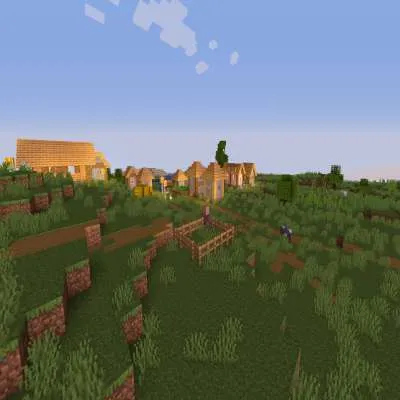
官方网站,提供更多下载和更新日志:https://sildurs-shaders.github.io/
如果你想支持我并认可我的工作,可以访问Patreon:https://www.patreon.com/Sildur
支持的《我的世界》版本为1.7.10 - 1.21.8。
自2.5版本起支持“遥远地平线”。
关于:
基础光影回归!大约于2013年首次推出。这是一款非常轻量且快速的光影包,具有大量可定制功能。
它支持以下选项:TAA(抗锯齿)、锐化(与TAA配合使用)、SSAO(环境光遮蔽)、卡通渲染、色彩增强、交叉处理(颜色滤镜)、自定义自发光光照图、自定义太阳/月亮角度、色调映射、景深、运动模糊、凹凸和视差映射以及所有波动效果。游戏内选项中还有5种预设:极快、快速、快速+运动模糊、快速+景深和精美。
使用权限:
你不得编辑、复制代码,也不得以不同名称分享我的光影包或将其据为己有。
使用Iris安装:
1. 下载并安装《我的世界》,设置你想要运行的游戏版本配置文件。
2. 下载并使用Java运行Iris的jar文件。
3. 在安装程序中,选择“Iris和Sodium”,选择你的《我的世界》版本,取消勾选“作为织物模组安装”,然后点击安装。
4. 运行《我的世界》启动器,选择新创建的配置文件。(如果未创建新配置文件,请自行创建一个)
5. 启动游戏。
6. 进入选项 -> 视频设置 -> “光影包”,然后点击“打开光影包文件夹”按钮。
7. 下载我的光影包并将其放入新打开的窗口中。
8. 在游戏内列表中选择我的光影包,享受全新视觉效果!
注意:Iris+Sodium也可以作为织物模组安装。
使用Optifine安装:
1. 下载并安装《我的世界》,设置你想要运行的游戏版本配置文件。
2. 下载并使用Java运行Optifine的jar文件。它将安装一个新的Optifine配置文件。
3. 运行《我的世界》启动器,选择新创建的Optifine配置文件。
4. 启动游戏。
5. 进入选项 -> 视频设置 -> 光影,然后点击屏幕底部的“光影文件夹”按钮。
6. 下载我的光影包并将其放入新打开的窗口中。
7. 在游戏内列表中选择我的光影包,享受全新视觉效果!
链接:
推特
Discord
脸书
Official website with more downloads and changelogs: https://sildurs-shaders.github.io/
Patreon if you want to support me and like what I do: https://www.patreon.com/Sildur
Supported minecraft versions are 1.7.10 - 1.21.8.
Distant Horizons is supported since version 2.5.
About:
Return of the basic shaders! First started in like 2013. It is a very lightweight and fast shaderpack, featuring lots of customization.
It supports the following options: TAA (antialiasing), Sharpening (used with TAA), SSAO (ambient occlusion), Celshading, Colorboost, Crossprocess (color filter), Custom emissive lightmaps, Custom sun/moon angle, Tonemapping, Depth of Field, Motionblur, Bump and Parallax mapping and everything wavy. There are also 5 presets available in the ingame options: Very Fast, Fast, Fast+MB, Fast+DoF and Fancy.
Permissions:
You are not allowed to edit, copy code or share my shaderpack under a different name or claim it as yours.
Install using Iris:
1. Download and install Minecraft, setup your game profile of the version you want to run.
2. Download and run the Iris jar file with Java.
3. In the installer, select "Iris and Sodium" pick your minecraft version and uncheck "install as fabric mod" then hit install.
4. Run the minecraft launcher and select the newly created profile. (Create a new profile if it didn't create one)
5. Start the game.
6. Go to options -> video settings -> "Shader Packs" and press on the "Open Shader Pack folder" button.
7. Download my shaderpacks and place them in the newly opened window.
8. Select my shaderpack from the list ingame and enjoy your new visuals!
Note: Iris+Sodium can also be installed as a fabric mod.
Install using Optifine:
1. Download and install Minecraft, setup your game profile of the version you want to run.
2. Download and run the optifine jar file with Java. It will install a new optifine profile.
3. Run the minecraft launcher and select the newly created optifine profile.
4. Start the game.
5. Go to options -> video settings -> shaders and press on the "Shaders folders" button at the bottom of the screen.
6. Download my shaderpacks and place them in the newly opened window.
7. Select my shaderpack from the list ingame and enjoy your new visuals!
Links:
Twitter
Discord
Facebook
本站是资源分享站,资源均来自于互联网和用户自发分享,仅供学习和交流使用。如有版权问题,请联系管理员删除。
操作
创作者
待认领资源
成为此资源的创作者
其他链接
最近更新资源
神秘启旅 ~ Thaum Journey
热度 2462 | 3 天前更新
愚者 - The Fool
热度 81431 | 3 天前更新
咒术回战(咒术战斗) - Jujutsu Kaisen (Sorcery Fight)
热度 2802 | 4 天前更新
诡厄使徒:诸神黄昏
热度 169 | 4 天前更新
终焉决斗NW
热度 266 | 4 天前更新
Minecraft-摄影奇境
热度 330 | 5 天前更新
无限遗产II - Infinity Legacy II
热度 3729 | 5 天前更新
机械动力:黄铜协奏曲
热度 4216 | 5 天前更新
ATM10:空岛 - All the Mods 10: To the Sky
热度 268 | 1 周前更新
魔女之旅
热度 1145 | 1 周前更新
石头世界4 FTB StoneBlock 4
热度 4266 | 1 周前更新
通天之路
热度 1824 | 1 周前更新
评论区 (0)
登录 后才能发表评论
快来发表第一条评论吧!