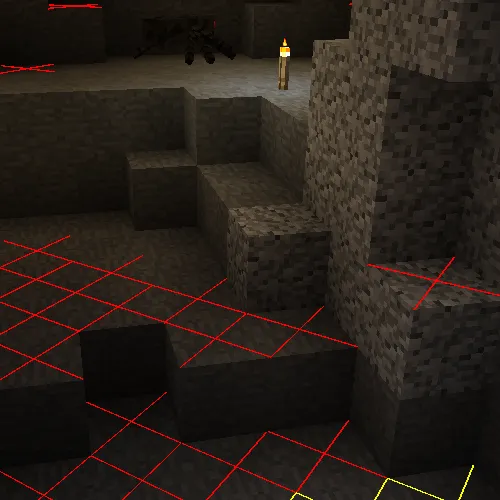
这个模组添加了一些来自NEI的叠加层。
仅客户端模组!
更新/信息:
你们中的大多数人可能已经注意到这个模组仍然停留在1.14版本。虽然我过去曾尝试更新这个模组,但这需要完全重写。由于我目前在《我的世界》,尤其是模组化的《我的世界》中不太活跃,所以我对更新它没有太大兴趣。很抱歉,你们可以在这里查看由RiDGo8独立更新的版本:https://www.curseforge.com/minecraft/mc-mods/more-overlays-updated
请在此处(Github上的问题页面)报告任何问题和建议。
我可能不会注意到评论中的问题或建议。
(在撰写问题之前,请检查模组/模组包版本)
叠加层:
- 区块边界
- 光照等级/生物生成(16格范围)
- 物品搜索(仅在安装了JEI时可用)
默认按键:
- F9:区块边界
- F7:光照等级/生物生成
- 双击JEI搜索栏进行物品搜索
在0.5版本或更高版本中,你可以在游戏内更改配置:
- 从主屏幕:模组 -> 更多叠加层 -> 配置
- 从暂停菜单:模组选项... -> 更多叠加层 -> 配置 [在《我的世界》1.14.x中此方法无效,因为暂停菜单中没有“模组选项...”]
生物生成/光照等级:
如果怪物在夜间可以生成,则在方块上显示黄色X;如果随时都可以生成,则显示红色X。
区块边界:
有三种模式,它会在区块的角落显示红线,并在区块中间显示黄线。
在第二种模式下,它还会在区块边缘显示绿色网格。
在第三种模式下,绿色网格会勾勒出《我的世界》或立方区块区域,并在左上角显示相应的区域存档文件。(自1.15.0版本起,适用于《我的世界》1.12.2)
物品栏搜索:
仅在安装了JEI时有效。
如果启用,你可以在JEI中搜索物品,当前打开的物品栏中所有不符合筛选条件的物品都会被遮挡。
在1.10版本之前(适用于《我的世界》1.10.2/1.11.2),有一个按键绑定来启用该功能。
自1.10版本起,你可以双击JEI搜索栏来启用该功能(就像在NEI中一样)。
整合
这个模组与其他一些模组整合,以修复漏洞或添加功能。
- JustEnoughItems(由mezz制作):物品搜索仅在安装了JEI时可用,因为它使用JEI的搜索算法来突出显示物品。
- Custom Mob Spawner (由DrZharks制作):光照叠加层与该模组整合,根据该模组实现的自定义生成处理来显示生物可以生成的位置。(在1.16.0版本中暂时移除)
- OpenCubicChunks(由barteks2x制作):区域叠加层显示立方区块使用的存档文件。(区块和区域网格需要改进)
- Mantle:物品搜索与Mantle的GUI API整合,以便在屏幕上显示物品栏槽位的位置。
我允许在模组包中分发我的模组。如果能给予我致谢就更好了。
允许重新上传文件(但仅在下载免费的情况下,因为该模组的商业用途违反了《我的世界》最终用户许可协议,但你可以将我的代码用于任何你想做的事情)
请尽量保持你网站上的文件更新,并且 不要在模组和《我的世界》版本上说谎。(如果没有适用于《我的世界》1.13的文件,不要在标题中写“更多叠加层1.12 / 1.13”)
This mods adds some of the overlays from NEI.
Client Side only mod!
Update / Info:
Most of you probably notices that this mod is still stuck in 1.14. While I've made attempts to get this mod updated in the past, it would require a full rewrite. Since I'm currently not really active in Minecraft especially Modded Minecraft, I don't have much interest updating it. I'm sorry, you can checkout a independently updated version made by RiDGo8 here: https://www.curseforge.com/minecraft/mc-mods/more-overlays-updated
Please report any Issues and Suggestions here (Issue Page on Github).
I might not notice issues or suggestions in the Comments.
(Check the Mod / Modpack version before you write an Issue)
Overlays:
- Chunk Boundaries
- Light Level / Mob spawns ( 16 block range )
- Item search (only if JEI is installed)
Default Keys:
- F9 : Chunk Boundaries
- F7 : Light Level / Mob spawns
- Double click on the JEI Search Field for Item Search
In version 0.5 or above you can change the config ingame:
- from the Main Screen: Mods -> MoreOverlays -> Config
- from the Pause Menu: Mod Options... -> MoreOverlays -> Config [Not working in Minecraft 1.14.x since "Mod Options..." is missing in the pause menu]
Mob Spawns / Light Level:
Shows a yellow X on blocks if monsters can spawn at night or a red X if spawns are always possible.
Chunk Boundaries:
Has three modes it shows red lines in the corners and a yellow line in the middle of the chunk.
In the 2. mode it also shows a green grid on the edges of the chunk.
In the 3. mode the green grid outlines a minecraft or cubicchunks region and displays the corresponding region save file in the top left corner. (since version 1.15.0 for minecraft 1.12.2)
Inventory Search:
Only works if JEI is installed.
If it is enabled you can search in JEI for items and all items in the currently open inventory that doesn't match the filter will get blacked out.
Before 1.10 (for MC 1.10.2/1.11.2) there was a Keybinding to enable that feature.
Since 1.10 you can double click on the JEI Search bar to enable that feature (Just like in NEI).
Integration
This mod integrates with some other mods to fix bugs or add features.
- JustEnoughItems (by mezz): Item Search only works when JEI is installed since it uses the search algorithm from JEI to highlight items.
- Custom Mob Spawner (by DrZharks): Light Overlay integrates with that mod to show where mobs can spawn according to the custom spawn handling implemented by that mod. (temporary removed in 1.16.0)
- OpenCubicChunks (by barteks2x): Region Overlays show the save files that cubic chunks uses. (Chunk & Region grids needs improvement)
- Mantle: Item Search integrates with the GUI API that is part of mantle in order to show slots at the position they appear on screen.
I allow distribution of my mod in modpacks. Would be nice if you give credits
Reuploading the file is allowed ( But only if the download is free, because commercial use of this mod is against the Minecraft EULA, but you can use my code for anything you want)
Please try to keep the files on your website updated and don't lie about the Mod and Minecraft Version. (If there is no file for MC 1.13 don't write in the Tile "More Overlays 1.12 / 1.13" )
本站是资源分享站,资源均来自于互联网和用户自发分享,仅供学习和交流使用。如有版权问题,请联系管理员删除。
操作
创作者
待认领资源
成为此资源的创作者
其他链接
最近更新资源
神秘启旅 ~ Thaum Journey
热度 2478 | 5 天前更新
愚者 - The Fool
热度 81590 | 5 天前更新
咒术回战(咒术战斗) - Jujutsu Kaisen (Sorcery Fight)
热度 2820 | 5 天前更新
诡厄使徒:诸神黄昏
热度 193 | 5 天前更新
终焉决斗NW
热度 311 | 5 天前更新
Minecraft-摄影奇境
热度 361 | 6 天前更新
无限遗产II - Infinity Legacy II
热度 3746 | 6 天前更新
机械动力:黄铜协奏曲
热度 4222 | 6 天前更新
ATM10:空岛 - All the Mods 10: To the Sky
热度 290 | 1 周前更新
魔女之旅
热度 1178 | 1 周前更新
石头世界4 FTB StoneBlock 4
热度 4278 | 1 周前更新
通天之路
热度 1896 | 1 周前更新
评论区 (0)
登录 后才能发表评论
快来发表第一条评论吧!