Model Gap FIX
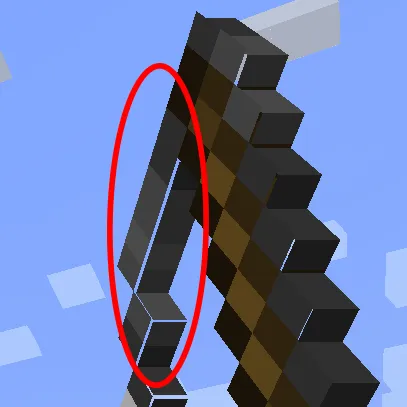
This is a simple client mod that (attempts) fixes https://bugs.mojang.com/browse/MC-73186
which affects both Block Models and Item Models and possibly other models too
The mod works by removing "texture zooming", a feature of the game added to mitigate another issue, atlas bleeding.
With it on the game will stretch each texture a bit, making every model face not use its entirety to prevent neighboring textures to "bleed" into itself.
When the mod is on each quad texture will take up exactly 100% of its own texture area.
This not only fixes this bugs on items (where it's most noticeable) but with block models too and everything else that might use those functions.
NOTE:
This "fix" seems to work on many systems and setups that are not effected by atlas bleeding. Unfortunately its not all so if you see textures bleeding onto neighboring blocks this mod is not for you.
This issue was especially noticeable with custom block models or some 2d items.
Q&A:
- Will this slow down my game?
Not at all! Removing "texture zooming" just removes some code and has no impact. If you however want to be nit picky the mod also slightly tweaks item models in a way that could add a ouple more quads for concave item textures compared to vanilla so in that case it could very slightly worse that vanilla. This is however negligible and could only be an issue when trying to run high resolution packs
- How does this work?
The base fix is simply removing texture zooming. This is extremly simple to do and immediately "fixes up" all those problematic gaps on models.
Such a feature was in the game to prevent an artifact called "atlas bleeding" which makes the edges of a texture bleed into the one next to it on the texture atlas. From my testing however this issue isnt present for most hardwares so the mod just gets rid of it. If you experience such an issue just uninstall the mod. Note that it has been reported that on many mac os such an issue is present so the mod "takes care" of that by simply disabling its main fix only keeping the slight item model adjustment. This isnt ideal but can somewhat reduce the gaps altho just in item models
For 2d item models something else is needed as this alone creates another kind of tiny gaps in them due to the way they are generated, quad by quad. These are very tiny and they flicker so I had to fix those too. To do so I've changed the item model generator to never create a quad that encompasses a transparent pixel and instead create multiple quads for each row of solid pixel in the same direction. This allows me to slightly increase the size of all these side quads without creating new gaps in the process, thus covering all gaps seamlessly. Note that this last part only applies to forge as fabric does not seem to have such tiny lines and the models work right away with no extra quad
- I still see some lines
If you do these are different from the ones that you would normally see and usually are extremely tiny in the range of single pixels. From my understanding these appear due to some rounding errors and vary on the system you are in. To get rid of them you can access the mod configs and slightly tweak the 2 values until they disappear
本站是资源分享站,资源均来自于互联网和用户自发分享,仅供学习和交流使用。如有版权问题,请联系管理员删除。
操作
创作者
待认领资源
成为此资源的创作者
其他链接
最近更新资源
神秘启旅 ~ Thaum Journey
热度 2462 | 3 天前更新
愚者 - The Fool
热度 81440 | 3 天前更新
咒术回战(咒术战斗) - Jujutsu Kaisen (Sorcery Fight)
热度 2804 | 4 天前更新
诡厄使徒:诸神黄昏
热度 169 | 4 天前更新
终焉决斗NW
热度 277 | 4 天前更新
Minecraft-摄影奇境
热度 330 | 5 天前更新
无限遗产II - Infinity Legacy II
热度 3738 | 5 天前更新
机械动力:黄铜协奏曲
热度 4216 | 5 天前更新
ATM10:空岛 - All the Mods 10: To the Sky
热度 268 | 1 周前更新
魔女之旅
热度 1145 | 1 周前更新
石头世界4 FTB StoneBlock 4
热度 4268 | 1 周前更新
通天之路
热度 1824 | 1 周前更新
评论区 (0)
登录 后才能发表评论
快来发表第一条评论吧!