关于
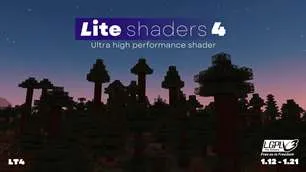
这是一款“化妆 - 超快着色器”修改版,旨在让这款出色的着色器运行得更快!该着色器在保持良好视觉效果的同时,具备出色的性能。它增加了许多自定义选项,并提供葡萄牙语翻译。无论是想提升《我的世界》Java版视觉效果的低配置电脑用户,还是追求高帧率、良好画质和清晰阴影的高配置电脑用户,都可以使用它。
测试环境:
- 《我的世界》1.12 - 1.21.x
- NVIDIA、AMD和英特尔显卡,不保证在所有硬件上都能运行。
- Windows 10和11。
特性:
这些特性中的大多数都可以关闭或降低效果以提升性能。
- 阴影投射
- 风格按钮,可快速在写实外观和原版外观之间切换。
- 彩色阴影
- 丁达尔效应(上帝光线)
- 自适应对比度TAA(时间抗锯齿)
- 基于材质的反射(光泽度)
- 写实和原版风格的云
- 环境光遮蔽
- 泛光和运动模糊
- 写实和原版风格的水
- 超过10种自定义配色方案
- 可选的自动曝光
- 快速光线步进和翻转图像反射
- 支持远景(仅Iris适用)
- 水的折射
- 景深效果
- 以及更多……
图库
如何配置?
配置文件:
- 无效果:纯着色器
- 无阴影:关闭阴影的低、中、高配置文件。
- 极低 - 高:以牺牲性能为代价,逐步提高效果的质量和数量。
- 选择最适合你的!
配色方案:
- 更改天空和光照的颜色。“写实+”是默认且最推荐的方案。
风格:
- 点击风格按钮,可在增强和原版之间切换。增强风格旨在呈现写实效果,而原版风格保留《我的世界》的美学风格。
屏幕设置:
- 基础:着色器的基本特性。
- 光照:阴影质量、距离、光照强度等。
- 效果:着色器的大多数选项,分为子屏幕,如渲染、相机等。
- 信息:关于着色器的信息。
如何安装?
- 首先,你需要Iris着色器或OptiFine:https://irisshaders.dev/ https://optifine.net/downloads
- 将“LITE shaders.zip”文件夹放在“.minecraft/shaderpacks”目录下。
- 启动已安装Iris或OptiFine的《我的世界》。
- 打开:“选项 -> 视频设置 -> 着色器”
- 选择“LITE shaders”。
最低配置建议:
- 《我的世界》Java版1.12,1.11也能运行,但会有一些问题。
- 英特尔HD 4000或更好的显卡。
- “中”配置文件。
- 关闭“智能树叶”,因为它可能会破坏光照效果。
致谢:
原作者:哈维尔·加尔杜尼奥(Javier Garduño)链接:
https://www.planetminecraft.com/mod/makeup-ultra-fast-shader https://www.curseforge.com/minecraft/customization/makeup-ultra-fast-shader https://github.com/javiergcim/MakeUpUltraFast
由恩托基托·德宗泽(Entokito Dezonze)修改和翻译。
LITE着色器分支的致谢:
- 添加“化妆”着色器的致谢以及这些链接:(https://modrinth.com/shader/lite-shaders) (https://www.curseforge.com/minecraft/shaders/lite-shaders) 并注明创作者:由@Entokito - Dezonze修改和翻译。
巴西制造!
警告:
此着色器仅在CurseForge、Modrinth、Planet Minecraft和TLMods上提供。从其他任何网站下载可能不安全。我并未正式将其上传到其他任何网站。
ABOUT
This is a MakeUp - Ultra Fast shaders modification that aims to make this amazing shader even faster! This shader maintains good looks while having great performance. Adding so many customization and a Portuguese translation. It can be used both by people with potato PCs that want to enhance Minecraft Java visuals and by people with good PCs who want high frame rates with good graphics and sharp shadows.
TESTED ON:
- Minecraft 1.12 - 1.21.x
- NVIDIA, AMD and Intel, NO warranty that it works on all hardware.
- Windows 10 and 11.
Features:
Majority of these features can be turned off or reduced to enhance performance.
- Shadow casting
- Style button for fast switching of Realistic looks and Vanilla.
- Colored shadows
- Godrays
- Adaptative contrast TAA (Temporal anti-aliasing)
- Material based reflection (Gloss)
- Realistic and Vanilla clouds
- Ambient occlusion
- Bloom and Motion blur
- Realistic and Vanilla water
- +10 customized color schemes
- Optional auto-exposure
- Fast Raymarch and Flipped image reflections
- Distant horizons support (Iris only)
- Water refraction
- Depth of Field
- And more…
Gallery
How to config?
PROFILES:
- No effects: Pure shader
- Shadowless: Low, Medium and MAX profiles with shadows turned off.
- Very low - MAX: Progressively increase the quality and amount of effects at the cost of performance.
- Choose the best for you!
COLOR SCHEME:
- Change the color of sky and lighting. Realistic+ is the default and most recommended.
STYLE:
- By clicking on the style button, you switch between Enhanced and Vanilla, Enhanced aims to be realistic, and Vanilla preserves the Minecraft aesthetic.
SCREENS:
- Basic: Basic features of shader.
- Lighting: Shadow quality, distance, light intensity, etc.
- Effects: Majority of options of shader, separed into sub-screens, such as Rendering, Camera, etc.
- Info: Information about the shader.
How to install?
- First, you need Iris shaders or OptiFine: https://irisshaders.dev/ https://optifine.net/downloads
- Put LITE shaders.zip folder at .minecraft/shaderpacks
- Launch Minecraft with Iris or OptiFine installed.
- Open: "Options -> Video Settings -> Shaders"
- Choose LITE shaders.
Minimum recommendations:
- Minecraft Java 1.12, 1.11 works but with some bugs.
- Intel HD 4000 or better.
- "Medium" profile.
- Smart leaves turned off, as it can broke lighting.
CREDITS:
Original creator: Javier Garduño Links:
https://www.planetminecraft.com/mod/makeup-ultra-fast-shader https://www.curseforge.com/minecraft/customization/makeup-ultra-fast-shader https://github.com/javiergcim/MakeUpUltraFast
Modified and translated by Entokito Dezonze.
Credits for forks of LITE shaders:
- Add the credits of MakeUp and these links: (https://modrinth.com/shader/lite-shaders) (https://www.curseforge.com/minecraft/shaders/lite-shaders) plus creator credit: Modified and translated by @Entokito-Dezonze
Made in Brazil!
WARNING:
This shader is only available on CURSEFORGE, MODRINTH, PLANET MINECRAFT and TLMODS. Downloading it from any other site may not be safe. I haven't officially uploaded it to any other site.
本站是资源分享站,资源均来自于互联网和用户自发分享,仅供学习和交流使用。如有版权问题,请联系管理员删除。
操作
创作者
待认领资源
成为此资源的创作者
其他链接
最近更新资源
假面骑士冒险
热度 3667 | 2 天前更新
天空开拓者:耕云纪元
热度 156 | 2 天前更新
火影之旅
热度 224 | 2 天前更新
直至永恒
热度 149 | 2 天前更新
ATM10:空岛 - All the Mods 10: To the Sky
热度 708 | 2 天前更新
植物大战僵尸+ - Plants vs. Zombies+
热度 605 | 2 天前更新
石头世界4 FTB StoneBlock 4
热度 4572 | 2 天前更新
奇妙商店物语
热度 598 | 2 天前更新
阿卡迪亚的天启:天选之歌
热度 335 | 1 周前更新
虚饰作品-Fictional
热度 4523 | 1 周前更新
机械动力:工业与牧歌 - Create: Industry and Pastoral
热度 4315 | 1 周前更新
通天之路
热度 2671 | 1 周前更新
评论区 (0)
登录 后才能发表评论
快来发表第一条评论吧!