DrDestens我的世界光影
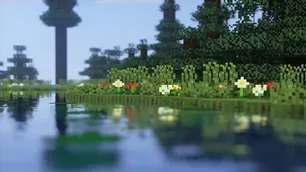
DrDestens我的世界光影是一款适用于《我的世界:Java版》的光影包。它具有带反射效果的水特效、环境光遮蔽、泛光、逼真的景深、运动模糊、时间抗锯齿(TAA)以及许多其他特性。该光影包支持LabPBR和OldPBR/SeusPBR标准,你可以搭配PBR材质包使用,以增加细节。
特性概述
- 屏幕空间反射
- 景深
- 屏幕空间环境光遮蔽(SSAO)
- 时间抗锯齿(TAA)
- 基于物理的渲染
- 各种水特效
- 丁达尔效应(上帝光)
- 泛光
- 运动模糊
- 逼真的景深色差
- 自定义天空渐变
- 改进的带有日落效果的雾
- 改进的动态光照
- 方向光地图
- 轮廓
- 自定义方块选择轮廓
完整特性列表
光照
- PBR
启用基于物理的渲染
确保在OptiFine光影选项中启用法线和高光贴图 - PBR格式 - LabPBR 1.3、SeusPBR / OldPBR
- 基于物理的渲染
- 高度作为环境光遮蔽
使用高度信息来生成环境光遮蔽 - 法线贴图修复
对于较新的OptiFine版本,这可能不是必需的
如果法线贴图在实体或手持物品上不显示,请启用此选项 - 使用硬编码金属
如果禁用,光影将使用颜色作为反射率数据
仅适用于LabPBR - 次表面散射
- 视差遮蔽贴图
使用高度图为方块添加额外细节
对性能影响较小
可能会在屏幕边缘产生瑕疵 - 视差遮蔽贴图深度
指定视差遮蔽贴图的深度
值越高越容易产生瑕疵 - 视差遮蔽贴图扭曲
夸大高度图
有助于在视差遮蔽贴图深度值较小时创造更多深度
与高视差遮蔽贴图深度值一起使用时会产生瑕疵 - 平滑视差遮蔽贴图
平滑高度图
显著减少瑕疵
- 高度作为环境光遮蔽
- 天光环境光遮蔽
指定天光上的环境光遮蔽量 - 方块光环境光遮蔽
指定方块光上的环境光遮蔽量 - 天光伽马值
值越高 = 越暗
值越低 = 越亮 - 方块光伽马值
值越高 = 越暗
值越低 = 越亮 - 最小光照
限制方块光永远不低于此值
防止洞穴漆黑一片(除非你将其设置为零) - 光地图颜色
- 下界环境亮度
- 末地环境亮度
- 末地环境饱和度
- 天光明(RGB颜色选择器)
- 天光夜(RGB颜色选择器)
- 方块光(RGB颜色选择器)
选择方块光颜色(火把、萤石等)
如果启用“复杂方块光”,将不使用此颜色 - 复杂方块光
允许你为方块光选择两种颜色
一种用于较暗部分,一种用于较亮部分 - 混合曲线
值越高:强调“明亮”颜色
值越低:强调“黑暗”颜色
50 = 线性过渡 - 复杂方块光较暗颜色(RGB颜色选择器)
- 复杂方块光较亮颜色(RGB颜色选择器)
景深
- 景深
模糊非聚焦物体,就像真实相机一样 - 焦外成像采样数
模糊质量
值越高越好
对性能影响显著 - 景深强度
景深效果的强度
对性能影响较小 - 最大模糊 - 高、无限制
限制景深模糊的强度
在使用较低采样数时有助于减少瑕疵,更适合游戏体验 - 景深下采样量
景深效果发生的下采样量
减少景深瑕疵,增加像素化瑕疵
对性能无/影响较小 - 仅远处模糊
仅模糊远处物体 - 样本剔除
通过(主要)消除颜色渗出来提高景深质量
可能对性能有显著影响 - 对焦延迟
设置对焦调整所需的时间
反射
- 反射模式 - 关闭、天空、翻转图像、光线追踪
- 光线追踪质量
光线追踪迭代次数
值越低速度越快 - 厚度估计修正 - 无限
如果反射盲点让你困扰,可以增加此值
影响对像素厚度的假设
对性能无影响 - 边缘渐变
- 反射阈值
仅适用于PBR
设置为使屏幕空间反射(SSR)启用所需的最小反射率
值越高可能会导致反射截断 - 屏幕空间折射
扭曲透过水看到的物体 - 折射强度
- 玻璃反射
为有色玻璃方块添加反射
水
- 波动的水
“物理”波浪
移动水面 - 波浪高度
- 波浪法线 - 关闭、噪声、正弦
- 法线强度
假波浪,假装是真实的波浪
增加细节 - 法线比例
- 水吸收密度
- 水吸收偏差
为水雾距离添加一个常量
有助于使水更易见 - 水纹理
启用原版水纹理 - 水颜色选项
- 水吸收(RGB颜色选择器)
- 吸收颜色乘数
相机与色调映射
- 曝光
- 色调映射 - 自定义Reinhard、虚幻引擎
- 对比度
- 鲜艳度
- 饱和度
- 亮度
- 暗角 - 关闭、圆形、方形
使屏幕边缘变暗 - 暗角强度
后期处理
- TAA
时间抗锯齿
以稍微模糊图像为代价平滑边缘
可能会与OptiFine的高分辨率截图功能产生冲突 - TAA选项
- TAA混合常量
控制当前帧的不透明度
将此值设置得更低可使TAA更平滑 - TAA锐化
改变锐化效果的强度
- TAA混合常量
- 泛光
在明亮物体周围创建光晕
看起来很不错 ;) - 泛光强度
- 运动模糊
- 运动模糊强度
- SSAO
屏幕空间环境光遮蔽
使空洞处变暗
对性能影响较大 - SSAO质量 - 低、中、高
- SSAO强度
大气效果
- 雾 - 关闭、正常、边界
- 雾量
- 晨雾
在日落时增加雾量
仅在雾处于“正常”模式时有效
需要启用雾和日落效果 - 晨雾强度
- 洞穴雾
- 洞穴雾亮度
- 丁达尔效应(上帝光)
- 丁达尔效应(上帝光)颜色
- 丁达尔效应(上帝光)阳光(RGB颜色选择器)
- 丁达尔效应(上帝光)月光(RGB颜色选择器)
- 丁达尔效应(上帝光)强度
- 丁达尔效应(上帝光)半径
- 丁达尔效应(上帝光)采样数
- 天空颜色
- 天空正午(RGB颜色选择器)
- 天空日落(RGB颜色选择器)
- 天空午夜(RGB颜色选择器)
- 末地天空上部(RGB颜色选择器)
- 末地天空下部(RGB颜色选择器)
- 太阳角度
天气
- 降雨检测 - 温度、颜色
- 降雨不透明度
- 降雨折射
- 降雨折射强度
其他内容
- 轮廓 - 关闭、白色、黑色、彩虹色
- 轮廓距离
- 方块选择轮廓 - 黑色、白色、彩虹色
仅适用于较新的OptiFine版本(G7或更高版本) - 方块选择轮廓不透明度
- 波动方块
- 波动树叶
- 世界曲率
- 世界半径
- 手部不可见效果
在手持物品不可见时扭曲它们 - 白色世界
- 方向光地图
将法线贴图应用于动态光源
需要支持PBR的资源包 - 方向光地图强度
- 动态光亮度
改变发光方块发出的光的亮度
优化
- 平面顶点
在使用具有平滑表面的自定义模型时禁用
协议
允许你
- 在你的视频/截图中使用我的光影包
不允许你
- 重新分发我的光影包:如果你想提供下载链接,你必须链接到我的Modrinth / Curseforge页面
- 使用带收益的网址缩短器链接到我的光影包下载
- 未经我许可发布对我的光影包的修改版本
常见问题解答
你会添加阴影吗?
不,我不会。阴影对性能要求较高,会显著降低我的光影性能。
光影的部分内容出现故障 / 聊天中出现错误
我的光影完全不支持英特尔Mac电脑。
M1 Mac电脑会导致一些功能失效,而这是我无法修复的。你可以尝试禁用导致问题的功能。
现在怎么办?
如果这些情况都与你无关:请创建一个问题描述你的问题,或者加入我的Discord并在那里描述你的问题。
这些情况与你有关,但你仍然想使用我的光影?我无法正确调试这些问题,所以我无法修复它们。如果你可以接受不使用失效的功能,那就禁用它们。如果你无法禁用它们,请联系我,我可能会为此添加一个选项。
性能不佳
在选项中选择“低”配置文件。
尝试禁用这些功能:PBR、丁达尔效应(上帝光)、景深
DrDestens MinecraftShaders
DrDestens MinecraftShaders is a shaderpack for Minecraft: Java Edition. It features water effects with reflections, ambient occlusion, bloom, realistic depth of field, motion blur, TAA and many other things. The shaderpack supports the LabPBR and OldPBR/SeusPBR standard, and you can use it with PBR texturepacks for added detail
Feature Overview
- Screen Space Reflections
- Depth of Field
- Screen Space Ambient Occlusion (SSAO)
- Temporal Anti-Aliasing (TAA)
- Physically Based Rendering
- Various Water Effects
- Godrays
- Bloom
- Motion Blur
- Realistic DoF Chromatic Aberration
- Custom sky gradient
- Improved Fog with Sunsets
- Improved Dynamic Lighting
- Directional Lightmaps
- Outline
- Custom Block Selection Outline
Full Feature List
Lighting
- PBR
Enables Physically Based Rendering
Make sure you enable Normal and Specular mapsm in the OptiFine shader options - PBR Format - LabPBR 1.3, SeusPBR / OldPBR
- Physically Based Rendering
- Height as AO
Uses the Height information for Ambient occlusion - Normal Mapping Fix
With newer OptiFine versions this might not be necessary
Enable this if normal maps do not show on entities or handheld objects - Use Hardcoded Metals
If disabled, the shader will use the color for the reflectance data
LabPBR only - Subsurface Scattering
- Parallax Occlusion Mapping
Adds additional detail to blocks using the height map
Low performance impact
Can create artifacts at screen borders - POM Depth
Specifies how deep the POM goes
Higher values will create artifacts - POM Distortion
Exaggerates the height map
Helps create more depth with small POM Depth values
Creates artifacts when used with high POM Depth values - Smooth POM
Smooths out the height map
Significantly reduces artifacts
- Height as AO
- Skylight AO
Specifies the amount of ambient occlusion on skylight - Blocklight AO
Specifies the amount of ambient occlusion on blocklight - Skylight Gamma
Higher = Darker
Lower = Brighter - Blocklight Gamma
Higher = Darker
Lower = Brighter - Minimum Light
Restricts blocklight to never go below this value
Prevents caves from being pitch black (unless you set it to zero that is) - Lightmap Colors
- Nether Ambient Brightness
- End Ambient Brightness
- End Ambient Saturation
- Skylight Day (RGB Color Picker)
- Skylight Night (RGB Color Picker)
- Blocklight (RGB Color Picker)
Select blocklight color (torches, glowstone, etc.)
If "Complex Blocklight" is enabled, this color will NOT be used - Complex Blocklight
Allows you to select two colors for blocklight
One for dark parts, one for bright parts - Blend Curve
Higher: Emphasize "Bright" color
Lower: Emphasize "Dark" color
50 = linear transition - Complex Blocklight Dark (RGB Color Picker)
- Complex Blocklight Bright (RGB Color Picker)
Depth Of Field
- Depth of Field
Blurs non-focused objects, like a real camera - Bokeh Samples
Quality of the blur
Higher is better
Significantly affects performance - DoF Intensity
Intensity of the Depth of Field effect
Low performance impact - Maximum Blur - High, Unlimited
Limits the strength of the DoF blur
Helps reduce artifacts when using lower sample counts and is better for gameplay - DoF Downsampling Amount
Amount of Downsampling that takes place for the Depth of Field effect
Reduces DoF artifacts, increases pixelation artifacts
No/Low performance impact - Far Blur Only
Only blurs far away things - Sample Rejection
Improved DoF Quality by (mostly) removing color bleeding
Can have a significant performance impact - Focus Delay
Sets how long the focus takes to adjust
Reflections
- Reflection Mode - OFF, Sky, Flipped Image, Raytraced
- Raytracing Quality
Number of raytracing iterations
Lower is faster - Thickness Estimation Modifier - Infinite
Increase this if the reflection blind spots annoy you
Influences assumption about how thick a pixel is
No performance impact - Fade Edges
- Reflection Threshold
PBR only
Sets the minimum required reflectiveness in order for SSR to enable
Higher values may introduce reflection cutoffs - Screen Space Refraction
Distorts things seen through water - Refraction Strength
- Glass Reflections
Adds reflections to tinted glass blocks
Water
- Waving Water
"Physical" Waves
Moves the water surface - Wave Height
- Wave Normals - OFF, Noise, Sine
- Normals Strength
Fake Waves, pretending to be real ones
Added detail - Normals Scale
- Water Absorption Density
- Water Absorption Bias
Adds a constant to the water fog distance
Can help in making water more visible - Water Texture
Enables the vanilla water texture - Water Color Options
- Water Absorption (RGB Color Picker)
- Absorption Color Multiplier
Camera and Tonemapping
- Exposure
- Tonemapping - Custom Reinhard, Unreal
- Contrast
- Vibrance
- Saturation
- Brightness
- Vignette - OFF, Round, Square
Darkens screen borders - Vignette Strength
Post Processing
- TAA
Temporal Anti-Aliasing
Smooths edges at the cost of a slightly blurrier image
Might cause problems with OptiFine's high-res screenshot feature - TAA Options
- TAA Blending Constant
Controls the opacity of the current frame
Set this value lower for smoother TAA - TAA Sharpening
Changes the strength of the sharpening effect
- TAA Blending Constant
- Bloom
Creates a glow around bright objects
Looks nice ;) - Bloom Strength
- Motion Blur
- Motion Blur Intensity
- SSAO
Screen Space Ambient Occlusion
Makes cavities dark
High performance impact - SSAO Quality - Low, Medium, High
- SSAO Strength
Atmospherics
- Fog - OFF, Normal, Border
- Fog Amount
- Morning Fog
Increases fog amount during sunsets
Only works with fog in "Normal" mode
Requires fog and sunsets to be enabled - Morning Fog Strength
- Cave Fog
- Cave Fog Brightness
- Godrays
- Godray Colors
- Godray Sun (RGB Color Picker)
- Godray Moon (RGB Color Picker)
- Godray Strength
- Godray Radius
- Godray Samples
- Sky Colors
- Sky Noon (RGB Color Picker)
- Sky Sunset (RGB Color Picker)
- Sky Midnight (RGB Color Picker)
- End Sky Upper (RGB Color Picker)
- End Sky Lower (RGB Color Picker)
- Sun Angle
Weather
- Rain Detection - Temperature, Color
- Rain Opacity
- Rain Refraction
- Rain Refraction Strength
Other Stuff
- Outline - OFF, White, Black, Rainbow
- Outline Distance
- Block Selection Outline - Black, White, Rainbow
Only works with newer OptiFine versions (G7 or higher) - Block Selection Outline Opacity
- Wavy Blocks
- Wavy Leaves
- World Curvature
- World Radius
- Hand Invisibility Effect
Distorts handheld objects when invisible - White World
- Directional Lightmaps
Applies normal mapping to dynamic lights
Requires a ressource pack with PBR support - Directional Lightmap Strength
- Dynamic Light Brightness
Changes the brightness of light from emissive blocks
Optimisation
- Flat Vertices
Disable when using custom models with smooth surfaces
Agreement
You are allowed to
- Use my shaderpack in your videos / screenshots
You are not allowed to
- Redistribute my shaderpack: If you want to provide a download link you must link to my Modrinth / Curseforge page
- Use monetized URL shorteners linking to downloads of my shaderpack
- Publish edits of my shaderpack without my permission
FAQ
Will you add shadows?
No, I won't. Shadows are performance intensive and will decrease the performace of my shader significantly.
Parts of the shader are glitchy / there are errors in chat
My shader does not support Intel Macs at all.
M1 Macs will break some features, and that is something I can't fix. You can try disabling the features that cause problems.
What now?
If none of these things apply to you: please create an issue describing your problem or join my Discord and describe your problem there.
These things apply to you, but you still want to use my shader? I am unable to properly debug these issues, so I won't be able to fix them. If you are fine going without the features that break, disable them. If you can't disable them, contact me and I can probably add an option for that.
Performace is bad
Select the "Low" Profile in the options.
Try to disable these features: PBR, Godrays, DoF
本站是资源分享站,资源均来自于互联网和用户自发分享,仅供学习和交流使用。如有版权问题,请联系管理员删除。
操作
创作者
待认领资源
成为此资源的创作者
其他链接
最近更新资源
假面骑士冒险
热度 3671 | 2 天前更新
天空开拓者:耕云纪元
热度 156 | 2 天前更新
火影之旅
热度 228 | 2 天前更新
直至永恒
热度 151 | 2 天前更新
ATM10:空岛 - All the Mods 10: To the Sky
热度 710 | 2 天前更新
植物大战僵尸+ - Plants vs. Zombies+
热度 607 | 2 天前更新
石头世界4 FTB StoneBlock 4
热度 4572 | 2 天前更新
奇妙商店物语
热度 604 | 2 天前更新
阿卡迪亚的天启:天选之歌
热度 344 | 1 周前更新
虚饰作品-Fictional
热度 4525 | 1 周前更新
机械动力:工业与牧歌 - Create: Industry and Pastoral
热度 4317 | 1 周前更新
通天之路
热度 2701 | 1 周前更新
评论区 (0)
登录 后才能发表评论
快来发表第一条评论吧!