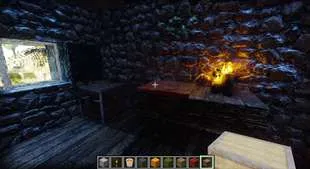
这是基于Chocapic13光影的编辑版本,结合CTMPOMFIX实现了带POM的无缝连接纹理。 这意味着它能够以一种前所未有的方式呈现出具有丰富变化的优质3D纹理。
这款光影还具备游戏内实时纹理放大功能 ,并且很快会有更出色的放大算法推出。
我还添加了支持PBR的全新光照系统 ,并且正在创建光线追踪/路径追踪版本 。别担心,如果你不想使用这些功能,可以将它们全部关闭,而且我添加的所有内容都高度可定制。
已确认在以下设备和软件上可用 :NVIDIA、AMD、Optifine以及Iris。
帧率低?
如果你的帧率较低 ,在光影设置中选择一个低预设值,就能轻松关闭所有光线追踪功能。在为其添加更多功能后,我会显著提升光线追踪的性能。
有 bug 吗??
我还推荐 1.4版本,适合那些只想获得稳定体验且不希望遇到任何错误的玩家。就其本身而言,这是一个完整的光影,拥有许多新功能,只是它不支持PBR或新的光照效果——这些效果虽然美观,但有时会出现错误,因为我正在重新制作它们,而且添加一个功能可能会破坏五个其他功能。1.5及更高版本并不完美,但它们在呈现独特美观的光影方面表现出色。请欣赏它们的特色,但如果你只想要一个完成度高的光影,那就选择1.4版本。
高设置,1.6.3版本
极致设置,1.6.3版本 - 但它还可以设置得更高
未来,即刻按你的方式畅玩
我正在打造一款我心目中理想的光影:作为一名玩家、纹理艺术家和程序员。
我努力为你带来高度可定制的体验,既能突破极限,又有预设值,能在各种硬件上开箱即玩。
选择你的性能,选择你的风格,享受来自未来的功能。
功能
基于Chocapic13的光影构建,有一套非常扎实的标准功能集,再加上我添加的所有内容 - 其中一些功能在其他地方找不到。我会根据需求不断添加新功能,以打造更好的3D纹理。如果你有任何功能请求,欢迎在此处或我的Discord上留言。
你可以通过查看图片选项卡、浏览下方内容或直接游玩来了解一些功能!
我一直在添加更多内容,所以我会不断在这个页面添加更多图片和视频。有些图片来自非常旧的版本,但也有一些视频解释和展示了功能,所以我还没有删除太多。页面有点乱。最新的图片可能在图片选项卡的底部。
有什么新内容
这是我展示更改和设置的最新更新视频:
图片:苔石和圆石 (带有3D过渡效果将它们融合在一起,1.4版本中可选的旧光照)
视频:游戏内实时纹理放大和过滤
资源包/模组致谢:
大多数截图使用了两个资源包:用于无缝3D纹理的 “未来资源包” 以及用于其他大部分内容的 “Patrix” 资源包。它们还使用了无方块模组以及许多其他模组。完整的模组列表在这个视频的描述中。
光影 致谢:
这款光影基于Chocapic13的光影构建。大部分代码由Chocapic13编写,除了 “CTMPOMFIX” / “Timetravelbeard的更好3D纹理” 以及 “PBR光照重做” 代码,这些由我编写。
Chocapic13关于光影编辑的许可协议包含在光影压缩包中,并且在这个折叠内容中,同时还有其他编辑的列表,因为管理员要求提供编辑被允许的证明:
Chocapic13允许进行编辑,前提是包含他的许可协议并正确命名。Curseforge已经托管了几个编辑版本:
https://www.curseforge.com/minecraft/customization/yofps-shader-chocapic13-edit
https://www.curseforge.com/minecraft/customization/vibrance-chocapic13-shaders-edit
https://www.curseforge.com/minecraft/customization/bliss-shader
https://www.curseforge.com/minecraft/customization/redhat-shader-v1-chocapic13-edit
以下是从其中一个版本中逐字提取的许可协议文本:
“许可协议,如Chocapic13所述:分享我的光影修改版本:你不允许声称 “Chocapic13光影” 中包含的任何代码是你自己的 如果你遵守以下命名规则,你可以分享我的光影修改版本:“ -光影包名称- (Chocapic13光影编辑)” 你不能使用任何盈利性链接(例如adfoc.us ; adf.ly)修改和分享的规则必须与这里相同(在你的帖子中复制粘贴所有这些规则,并根据你是否允许修改进行更改),你不能制定自己的规则,你只能选择是否允许重新分发。必须明确提及我的贡献 你不能使用任何早于 “Chocapic13光影V4” 的版本作为基础,不过你可以为个人使用修改旧版本 常识:如果你想要另一个光影包中的功能,或者想要使用在网上找到的一段代码,确保该代码是开源的。如有疑问,询问创作者。常识 #2:只有当你认为你的修改为光影包真正添加了有用的东西(不仅仅是更改了2 - 3个常量)时,才分享你的修改 特殊许可级别;经Chocapic13书面许可,如果你认为你的光影包与原始版本相比有重大修改:允许使用盈利性链接 允许创建你自己的分享规则 可以选择光影包名称 列在Chocapic13光影官方主题中 仍必须明确提及Chocapic13的贡献 使用这个光影包制作视频或图片:如果你在描述/信息中给出光影包名称,你可以使用这个光影包进行截图和制作视频 如果你遵守上述规则,你可以在盈利性视频中使用这个光影包 Minecraft网站:下载链接必须重定向到光影包官方主题中给出的下载链接 必须有一个指向光影包官方主题的链接 你不允许在光影包下载中添加任何盈利性链接 如果你不确定你被允许做什么或不被允许做什么,请在http://www.minecraftforum.net/ 上给Chocapic13发私信。不遵守这些规则可能且将会导致要求主机/管理员关闭主题/下载,无论是否发出警告。知识产权盗窃受法律制裁。”
未经过我编辑的Chocapic13光影在这里:
https://www.curseforge.com/minecraft/customization/chocapic13-shaders
我不知道Curseforge具体是如何运作的,但也请下载他们的未编辑版本,这样他们就能获得下载量。
非常感谢Chocapic13允许进行编辑。这让我现在就能为你提供这套功能,而无需从头编写整个光影。
最终我可能会从头编写一个光影,这样我就能更轻松地添加新功能并更好地优化性能,如果你希望看到这种情况发生,来Discord上告诉我。更新:实际上我现在正在做这件事,你可以在Discord和YouTube上查看进展。
图片:光线追踪环境天空光(为提高性能,默认在屏幕空间)1.4版本
为实现无缝3D纹理,你必须遵循以下说明
因为一些视频选项在光影设置之外,我无法对其进行调整。
这里还有一些不太好的截图:
视频:无缝 3D纹理变体、边缘和过渡效果,所有这些都没有POM通常会出现的问题。1.3版本
图片:石墙 (圆石的无缝3D连接纹理。如果你放大,你可以看到高度细节化的3D独立石块构成了一堵无缝且有变化的墙,只有通过我首创并包含在这个光影中的CTMPOMFIX技术才能实现 - 旧光照) 1.0版本
图片:泥土 (带有独立3D石块的无缝3D泥土纹理 - 旧光照) 1.0版本
图片选项卡中有更多截图
带有变化的无缝3D纹理说明:
-在 “视频设置:/ 质量” 中,将 “连接纹理” 设置为 “精美”
-在 “视频设置:/ 质量” 中,关闭 “更好的草”
-使用采用CTMPOMFIX的资源包(不使用CTMPOMFIX的资源包应按正常方式渲染)
-*如果你看到方块之间有任何错误的接缝,将 “初始POM质量” 调高到50左右(在CTMPOMFIX菜单中),默认的30是我尝试在几个光影中作为补丁测试的,不想让过高的默认值拖累你的系统。你还可以确保 “POM细化器” 设置为10,并禁用 “噪点”。
通用说明:
-如果天空出现过度曝光的白色光晕,在Optifine视频设置中关闭 “原版云”
版本都是什么意思?
发布版 意味着我认为自己在一段时间内完成了这个版本,或者我进行了重大更改,认为你应该更新到这个版本。
测试版 意味着据我所知它是稳定的,没有错误,但我仍在进行一些工作,我只是想让你在真的想玩的情况下能提前体验。
内部测试版 意味着存在错误,你需要遵循更新日志中的说明,否则体验会很差。我不建议游玩内部测试版。
如果你想了解有什么新内容,每次版本更新都要查看文件选项卡中的更新日志。我有时也会在其中添加YouTube视频链接,展示新内容。
1.2 具备无缝3D纹理变化
1.3 为POM添加了大量增强功能,光照仍然基于Chocapic13的版本
1.4 添加了纹理放大和过滤功能。
1.5 重新设计了PBR光照,带有一些可选的光线追踪功能。它并不完美,但有些效果看起来很酷。
1.6 有一个光物理模拟,每帧都会让数百万条光线在场景中多次散射和反弹。它格外动态且绚丽。
1.7是Iris的遥远地平线测试版本
1.8试图将遥远地平线测试与Optifine版本合并,并清理一些内容。
功能和菜单说明:
这是一个有些枯燥的视频,解释了CTMPOMFIX菜单中的一些功能。除非你想开启实时纹理放大或其他一些额外功能,否则你不应该观看这个视频,也不应该进入那个菜单。在这种情况下,可以使用视频中的时间轴。这一切都与更好的纹理,特别是更好的3D纹理相关。
兼容性:
我通常将其列为与1.19.2 Optifine兼容,因为这是我游玩和开发所使用的版本。
如果光影在你那里无法正常工作,来Discord上告诉我。我没有时间修复所有问题,但如果你不告诉我,我就不知道它出问题了。我没有时间和能力在所有设备和软件上测试这些光影。
1.5及以下版本的兼容性可能与未编辑版本相同,所以如果你想了解实际兼容性,可以去那里查看,如果我试图复制整个兼容性列表,很可能会出错:
未经过我编辑的Chocapic13光影在这里,展示了与旧版本的兼容性:
https://www.curseforge.com/minecraft/customization/chocapic13-shaders
资源包:
你可以来我的Discord获取关于我使用无缝3D技术的资源包的信息,因为它目前仍在开发中。
Curseforge上也有一个早期内部测试版。
而且仅包含圆石的演示版本以及高清版本也已经发布在这里,可供尝试:https://www.curseforge.com/minecraft/texture-packs/ctmpomfix-demo-seamless-pom-with-connected
如果你需要帮助制作一个使用这种技术的资源包,来我的Discord,我最终会制作教程,而且已经有关于它如何工作的文档。
不使用CTM - POM - FIX技术的资源包应按正常方式渲染。
问题/评论/更多信息:
请将所有问题和评论发送到我的Discord,我在那里可以更快回复。你还可以抢先了解即将推出的内容并参与讨论。
我的Discord:https://discord.gg/S6F4r6K5yU
This is a Chocapic13' Shaders edit with CTMPOMFIX for Seamless Connected Textures with POM. That means it can do really good 3d textures with variations in a way that has never been possible before.
This shader also features LIVE TEXTURE UPSCALING in game with more better upscaling algorithms coming soon.
I have also added a new lighting system with PBR support and am in the process of creating a raytracing/pathtracing version. Don't worry, you can turn all that off if you don't want to use it, and all my additions are highly customizable.
Confirmed to work on NVIDIA, AMD, OPTIFINE, AND IRIS.
low fps?
If you have low fps, using one of the low presets in shader settings will turn off all raytracing nice and easy. I will improve ray tracing performance significantly after I add a few more features to it.
bugs?
I also recommend version 1.4, for anyone who just wants a solid experience with no bugs. It is a completed shader for what it is and has a lot of new features, it just doesn't have PBR support or the new lighting, -which is both beautiful, and sometimes buggy, as I am in the process of redoing it, and adding one thing breaks five things. 1.5+ versions are not perfect, but they excel at being beautiful unique shaders. Please enjoy them for what they are, but stick to 1.4 if you just want a finished shader.
High setting, version 1.6.3
Ultra setting, version 1.6.3. -but it can go even higher
The Future, Ready to Play, Your way, Now
I'm making what I wish a shader could be: as a player, a texture artist, and a programmer.
I strive to bring you a highly customizable experience that can push the limits, but also has presets that are ready to play right out of the box on a wide range of hardware.
Choose your performance, choose your style, and enjoy features from the future.
features
Being built on top of Chocapic13's shaders there is a very solid standard feature set, plus everything I've added, -some of which you won't find anywhere else. I will keep adding new features as I want them, or need them to make Better 3D Textures. If you have any feature requests, feel free to comment here or on my discord.
You can see some of the features by checking the images tab, by browsing below, or just playing!
I keep adding more stuff so I just keep adding more pictures and videos to this page. Some of the pictures are from very old versions, but there are a few videos explaining and showcasing features, so I haven't deleted much yet. It's messy. The newest pictures are probably at the bottom of the images tab.
what's new
This is my last Update Video showcasing changes and settings:
Image: mossy cobblestone and cobblestone (with 3d transitions blending them together) with the optional old lighting in version 1.4
Video: live texture upscaling and filtering in game
CREDIT RESOURCE PACKS / MODS:
Most screenshots have 2 resource packs: resource pack from the future for Seamless 3D Textures, and Patrix for the majority of everything else. They also feature no-cubes, and a lot of mods. Full mod list is in this video's description.
SHADER CREDITS:
This shader is built on top of Chocapic13' shaders. Most of the code is by Chocapic13, except for the "CTMPOMFIX" / "Timetravelbeard's Better 3D Textures" and "PBR Lighting rework" code which is by me.
Chocapic13's license about shader edits is included in the shader zip, and is in this spoiler along with a list of other edits since moderators want proof edits are allowed:
Chocapic13'allows edits provided they include his license and are named appropriately. Curseforge hosts several edits already:
https://www.curseforge.com/minecraft/customization/yofps-shader-chocapic13-edit
https://www.curseforge.com/minecraft/customization/vibrance-chocapic13-shaders-edit
https://www.curseforge.com/minecraft/customization/bliss-shader
https://www.curseforge.com/minecraft/customization/redhat-shader-v1-chocapic13-edit
HERE IS THE TEXT OF THE LICENSE AS EXTRACTED VERBATIM FROM ONE OF THEM:
"License, as stated by Chocapic13: Sharing a modified version of my shaders: You are not allowed to claim any of the code included in "Chocapic13' shaders" as your own You can share a modified version of my shaders if you respect the following title scheme : " -Name of the shaderpack- (Chocapic13' Shaders edit) " You cannot use any monetizing links (for example adfoc.us ; adf.ly) The rules of modification and sharing have to be same as the one here (copy paste all these rules in your post and change depending if you allow modification or not), you cannot make your own rules, you can only choose if you allow redistribution. I have to be clearly credited You cannot use any version older than "Chocapic13' Shaders V4" as a base, however you can modify older versions for personal use Common sense : if you want a feature from another shaderpack or want to use a piece of code found on the web, make sure the code is open source. In doubt ask the creator. Common sense #2 : share your modification only if you think it adds something really useful to the shaderpack(not only 2-3 constants changed) Special level of permission; with written permission from Chocapic13, on request if you think your shaderpack is an huge modification from the original: Allows to use monetizing links Allows to create your own sharing rules Shaderpack name can be chosen Listed on Chocapic13' shaders official thread Chocapic13 still have to be clearly credited Using this shaderpack in a video or a picture: You are allowed to use this shaderpack for screenshots and videos if you give the shaderpack name in the description/message You are allowed to use this shaderpack in monetized videos if you respect the rule above. Minecraft websites: The download link must redirect to the download link given in the shaderpack's official thread There has to be a link to the shaderpack's official thread You are not allowed to add any monetizing link to the shaderpack download If you are not sure about what you are allowed to do or not, PM Chocapic13 on http://www.minecraftforum.net/. Not respecting these rules can and will result in a request of thread/download shutdown to the host/administrator, with or without warning. Intellectual property stealing is punished by law. "
Chocapic13' Shaders are here without my edit:
https://www.curseforge.com/minecraft/customization/chocapic13-shaders
I don't know how exactly curseforge works, but please download thier unedited version too so they get the downloads.
Big thanks to Chocapic13 for allowing edits. It lets me give you this feature set right now instead of writing a whole shader from scratch.
I will eventually write a shader from scratch so that I can more easily add new features and better tune performance, if you'd like to see that happen, come tell me on discord. Updates: I'm actually doing this now, you can check progress on discord and YouTube.
Image: ray traced ambient sky light (default in screen space for performance) version 1.4
YOU HAVE TO FOLLOW THE INSTRUCTIONS BELOW FOR SEAMLESS 3D TEXTURES
as some video options are outside of the shader settings and I can't adjust them.
Here are some more bad screenshots:
Video: Seamless 3D Texture Variants, edges and transitions, all without the problems POM usually has. version 1.3
Image: rock wall (Seamless 3d connected textures of Cobblestone. If you zoom in you can see highly detailed 3d individual rocks making up a seamless wall with variations as is only possible with the CTMPOMFIX technique I pioneered that is included in this shader.-old lighting) version 1.0
Image: dirt (Seamless 3d dirt texture with individual 3d rocks -old lighting) version 1.0
more screenshots in Images tab
INSTRUCTIONS for SEAMLESS 3D TEXTURES with VARIATIONS:
-Turn Connected Textures on Fancy ( in Video Settings: / Quality )
-Turn off Better Grass: ( in Video Settings: / Quality )
-Use a resource pack that uses CTMPOMFIX (resource packs that don't use CTMPOMFIX should render as they normally would)
-*If you see any buggy seams between blocks, Crank up Initial POM Quality to like 50 ( in the CTMPOMFIX menu ) the default 30 is me trying to test this as a patch in several shaders and not bog your system down with a high default. You can also make sure pom Refiner is set to 10, and disable noise.
GENERAL INSTRUCTIONS:
-if the sky is a blown out white glow, turn off Vanilla clouds in the optifine video settings
WHAT ARE THE VERSIONS?
Release means I think I'm done with it for a while, or I've made significant changes that I think you should update to.
Beta means it's stable with no errors I know about but I'm still working on stuff, I just want you to be able to play it early if you really want to.
Alpha means there are bugs and you need to follow instructions on the changelog or you'll have a bad time. I do not recommend playing alpha versions.
Always check the changelog in the files tab for each version if you want to see what's new. I also sometimes put links in there to YouTube videos showing what's new.
1.2 Has seamless 3D texture variations
1.3 adds a lot of enhancements to POM and the lighting is still base Chocapic13's
1.4 adds texture upscaling and filtering.
1.5 has reworked PBR lighting with some optional raytracing features. It's not perfect but some of it looks cool.
1.6 has a light physics simulation that scatters and bounces millions of rays of light through the scene multiple times, every frame. It is exceptionally dynamic and gorgeous.
1.7 is Distant Horizons test versions for Iris
1.8 is attempting the merge the distant horizons tests with the Optifine version and clean up some stuff.
FEATURES AND MENU EXPLAINED:
This is a boring video that explains some of the features in the CTMPOMFIX menu. You shouldn't watch it and you shouldn't go in that menu unless you want to turn on the live texture upscaling or some other extra features. In that case use the timestamps in the video. It's all related to Better Textures, especially Better 3D Textures.
COMPATIBILITY:
I generally have this listed as 1.19.2 Optifine compatibility because that's what I play and develop in.
If the shaders don't work for you, come tell me on discord. I do not have the time to fix everything, but I won't know it's broken if you don't tell me. I do not have the time or ability to test the shaders on everything.
Versions 1.5 and below are probably going to have the same compatibility as the unedited version, so look there for actual compatibility, if I try to copy that whole checklist I'll probably mess it up:
Chocapic13' Shaders are here without my edit and show compatibility for older versions:
https://www.curseforge.com/minecraft/customization/chocapic13-shaders
RESOURCE PACKS:
You can come to my discord for info on my resource pack using the Seamless 3D technique, as it's currently a work in progress.
There is also an early alpha version here on curseforge.
And the Demo of just cobblestone is also already up here with HD versions to try out: https://www.curseforge.com/minecraft/texture-packs/ctmpomfix-demo-seamless-pom-with-connected
If you want help making a resource pack that utilizes this technique, come to my discord, I will eventually be making tutorials, and there's already documentation on how it works.
Resource packs that don't use the CTM-POM-FIX technique should render as they normally would.
QUESTIONS / COMMENTS / MORE INFO:
Please direct all questions and comments to my discord, I can reply faster there. You can also get a sneak peek at what's coming soon and join the conversation.
My Discord: https://discord.gg/S6F4r6K5yU
本站是资源分享站,资源均来自于互联网和用户自发分享,仅供学习和交流使用。如有版权问题,请联系管理员删除。
操作
创作者
待认领资源
成为此资源的创作者
其他链接
最近更新资源
神秘启旅 ~ Thaum Journey
热度 2470 | 4 天前更新
愚者 - The Fool
热度 81476 | 4 天前更新
咒术回战(咒术战斗) - Jujutsu Kaisen (Sorcery Fight)
热度 2812 | 4 天前更新
诡厄使徒:诸神黄昏
热度 189 | 4 天前更新
终焉决斗NW
热度 289 | 4 天前更新
Minecraft-摄影奇境
热度 336 | 5 天前更新
无限遗产II - Infinity Legacy II
热度 3742 | 5 天前更新
机械动力:黄铜协奏曲
热度 4216 | 5 天前更新
ATM10:空岛 - All the Mods 10: To the Sky
热度 278 | 1 周前更新
魔女之旅
热度 1153 | 1 周前更新
石头世界4 FTB StoneBlock 4
热度 4274 | 1 周前更新
通天之路
热度 1842 | 1 周前更新
评论区 (0)
登录 后才能发表评论
快来发表第一条评论吧!