Chocapic13光影
高品质/性能比的光影包,可适配大范围的硬件配置。
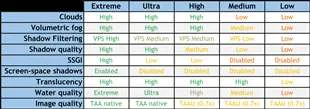
与许多轻量级光影包不同,即便在最低预设下,这款光影包也力图维持相当不错的画质水平。高端预设在诸如RX 570或GTX 1060这样的中端显卡上,简单场景下能达到约80 - 100帧/秒,甚至能超过120帧/秒,同时提供高质量的视觉效果。
特性(V9)
- 动态昼夜循环
- 符合物理原理的高动态范围光照系统
- 半影大小可变的阴影
- 密度可变且带有阴影的体积雾
- 体积云
- 具备水雾、反射、焦散和折射效果的水材质光影
- 屏幕空间全局光照(SSGI)
- 高品质的时间抗锯齿和图像放大(TAA / TAAU)
- 支持生物群系的自定义下界和末地
- 泛光
- 景深
- 对比度自适应锐化滤镜
- 摇曳的植物
- ……还有更多!
也可以看看我的高性能光影!
安装方法
只要Optifine独立于MC版本更新,光影就能正常工作。
- 下载并安装Optifine
- 下载光影包
- 启动《我的世界》
- 打开选项、视频设置、光影、光影包文件夹
- 将光影包(预设放在压缩文件内)放入.minecraft\shaderpacks文件夹中
- 在光影列表中选择光影
要求及已知问题
- 使用最新可用的显卡驱动
- 目标分辨率在每个轴向上至少需要500像素才能正常工作
- 在Optifine菜单中将阴影质量设为1.00x,并使用光影选项更改阴影分辨率。
- 在Optifine设置中将天空设为“开启”
- 将“旧版光照”设为“关闭”或“默认”
- 资源包自定义天空通常不受支持 - 模组可能能用也可能不能用,我不会处理模组兼容性问题
- 水下时,连接的覆盖纹理会出现问题
关于不同版本
- V6应该能在每个《我的世界》版本上运行
- V7、V8和V9至少需要适用于1.12版本的Optifine
- 由于每个预设都有特定的优化,无法通过当前的光影选项API启用,因此游戏内没有切换预设的选项 捐赠:
- 如果你想支持我制作这款光影(且力所能及),可以进行小额捐赠,我会非常感激!:)
- 未来没有计划推出超炫的“仅高级版可用”的光线追踪内容,因为我希望这款光影人人都能使用,捐赠不会获得任何额外收益
Chocapic13' Shaders
High quality/performance ratio shaderpack scaling to a large range of hardware configurations.
Unlike many lightweight shaderpacks, this one tries to maintain a decent quality level even at the lowest possible preset. The high-end presets are able to run at around 80-100 fps, and over 120 on a simple scene on a mid range gpu like the RX 570 or the GTX 1060 while offering high quality visuals.
Features (V9)
- Dynamic Time of Day cycle
- Physically plausible High Dynamic Range lighting system
- Shadows with variable penumbra size
- Variable density volumetric fog with shadows
- Volumetric clouds
- Water shader with water fog, reflections, caustics and refractions
- Screen Space Global Illumination (SSGI)
- High quality Temporal Anti-aliasing and upscaling (TAA / TAAU)
- Custom Nether and End with biome support
- Bloom
- Depth of Field
- Contrast-adaptative sharpening filter
- Wavy plants
- ... and much more !
Also check out my High Performance Shaders !
Installation
Shaders should work as long as Optifine is updated indepently of the MC version.
- Download and install Optifine
- Download the shaderpack
- Launch Minecraft
- Open Options, Video Settings, Shaders, Shaderpack Folder
- Put the shaderpacks (presets into zipped file) inside .minecraft\shaderpacks
- Select the shader in the shader list
Requirements and known issues
- Use the latest available graphic driver
- Requires at least 500 pixels on each axis on the target resolution to work properly
- Leave Shadow quality to 1.00x in optifine menu, and use the shader options to change shadow resolution.
- Set sky to On in optifine settings
- Set "Old lighting" to Off or Default
- Ressourcepack custom sky is usually not supported - Mods may work or not work and I won't work on mod compatibility
- Connected overlay texture have issues when under water
About the different versions
- V6 should run on every minecraft version
- V7, V8 and V9 requires at least Optifine for 1.12
- There is no in-game options in order to switch between presets because each preset has specific optimizations that can't be enabled with the current shader option API Donations:
- If you want to support me making this shader (and can afford it) you can do a small donation which is always highly appreciated ! :)
- There's no super fancy "premium only" raytraced stuff planned for the future because i want this shader to be available to everyone, you don't earn anything by donating
本站是资源分享站,资源均来自于互联网和用户自发分享,仅供学习和交流使用。如有版权问题,请联系管理员删除。
操作
创作者
待认领资源
成为此资源的创作者
其他链接
最近更新资源
神秘启旅 ~ Thaum Journey
热度 2496 | 6 天前更新
愚者 - The Fool
热度 81770 | 6 天前更新
咒术回战(咒术战斗) - Jujutsu Kaisen (Sorcery Fight)
热度 2838 | 1 周前更新
诡厄使徒:诸神黄昏
热度 216 | 1 周前更新
终焉决斗NW
热度 439 | 1 周前更新
Minecraft-摄影奇境
热度 403 | 1 周前更新
无限遗产II - Infinity Legacy II
热度 3782 | 1 周前更新
机械动力:黄铜协奏曲
热度 4279 | 1 周前更新
ATM10:空岛 - All the Mods 10: To the Sky
热度 342 | 1 周前更新
魔女之旅
热度 1220 | 1 周前更新
石头世界4 FTB StoneBlock 4
热度 4308 | 1 周前更新
通天之路
热度 1970 | 1 周前更新
评论区 (0)
登录 后才能发表评论
快来发表第一条评论吧!