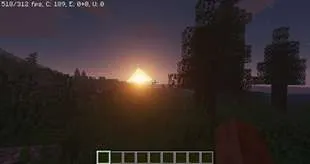
这款光影包的目标是在具备光影包核心功能的同时,保持极高的帧率。
例如,在使用“烤面包机”预设、渲染距离为8的情况下,搭配锐龙7处理器,RX 480显卡完全受限于CPU,帧率约为300 - 400帧/秒,而在英特尔HD620核显上也能达到约50 - 60帧/秒。
此外,由于它依赖简化的正向阴影渲染管线,与我的“经典”华丽光影包相比,它具有更好的模组兼容性,整体问题也更少。
特点:
- 阴影
- 动态昼夜
- 自定义天空渐变
- 太阳/月亮光晕
- 自定义下界和末地
目前仅提供最低质量预设,但其他预设很快就会推出!
安装方法:
- 下载并安装适用于您的《我的世界》版本的最新Optifine
- 下载光影包
- 启动《我的世界》
- 打开选项、视频设置、光影、光影包文件夹
- 将光影包(压缩文件)放入.minecraft\shaderpacks文件夹内
- 在光影列表中选择该光影
也可以看看我的其他光影包!
捐赠:
- 如果您想支持我制作这款光影(且有能力),可以进行小额捐赠,这将不胜感激!:)
- 未来没有计划推出超级炫酷的“仅高级版可用”的光线追踪内容,因为我希望这款光影能面向所有人,捐赠并不会获得任何额外收益。
The goal of this shaderpack is to have the core features of a shaderpack while maintaining extremely high framerates.
For example on the Toaster Preset at 8 render distance, a RX 480 is completely CPU-limited at around 300-400fps with a Ryzen 7, it can also run at around 50-60fps on an integrated Intel HD620.
Furthermore, because it relies on a simplified forward shading pipeline, it has better mod compatibility than my "classic" fancy shaderpack and less issues overall.
Features :
- Shadows
- Dynamic Time of Day
- Custom sky gradient
- Sun/moon glow
- Customized nether and end
At the moment only the lowest quality preset is available but other ones will follow soon !
Installation :
- Download and install the latest Optifine for your minecraft version
- Download the shaderpack
- Launch Minecraft
- Open Options, Video Settings, Shaders, Shaderpack Folder
- Put the shaderpack (zipped file) inside .minecraft\shaderpacks
- Select the shader in the shader list
Also check out my other shaderpack !
Donations:
- If you want to support me making this shader (and can afford it) you can do a small donation which is always highly appreciated ! :)
- There's no super fancy "premium only" raytraced stuff planned for the future because i want this shader to be available to everyone, you don't earn anything by donating
本站是资源分享站,资源均来自于互联网和用户自发分享,仅供学习和交流使用。如有版权问题,请联系管理员删除。
操作
创作者
待认领资源
成为此资源的创作者
其他链接
最近更新资源
神秘启旅 ~ Thaum Journey
热度 2500 | 6 天前更新
愚者 - The Fool
热度 81798 | 6 天前更新
咒术回战(咒术战斗) - Jujutsu Kaisen (Sorcery Fight)
热度 2842 | 1 周前更新
诡厄使徒:诸神黄昏
热度 216 | 1 周前更新
终焉决斗NW
热度 483 | 1 周前更新
Minecraft-摄影奇境
热度 411 | 1 周前更新
无限遗产II - Infinity Legacy II
热度 3782 | 1 周前更新
机械动力:黄铜协奏曲
热度 4279 | 1 周前更新
ATM10:空岛 - All the Mods 10: To the Sky
热度 342 | 1 周前更新
魔女之旅
热度 1220 | 1 周前更新
石头世界4 FTB StoneBlock 4
热度 4308 | 1 周前更新
通天之路
热度 1992 | 1 周前更新
评论区 (0)
登录 后才能发表评论
快来发表第一条评论吧!