关于:
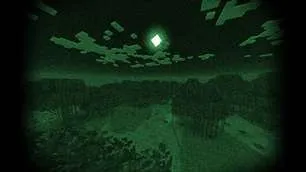
嗨,我是LoLip_p!这是一款模拟随身相机效果的光影。请在 Boosty 上支持作者。
你也可以尝试下载一个现成的 模组包。这个模组包添加了逼真的相机、武器和音效!还有一个服务器,你可以在那里和其他玩家一起玩!
服务器IP: bodycam.gomc.fun
截图:
该光影具备:
- 阴影
- 支持更好的云效果
- 支持远景效果
- 鱼眼效果
- 自动曝光
- 景深效果
- 运动模糊
- 暗角
- 色差
- 色彩校正
- 热成像仪
- 夜视镜
- 支持3种语言:英语、俄语、法语
推荐设置:
- 亮度:0
- 视野(Fov):110
链接:
- Discord(讨论、报错等)
- Telegram
- YouTube
安装光影
- 下载支持安装光影的客户端,如Optifine和Iris
- 下载光影
- 将光影复制到 /.minecraft/shaderpacks
- 启动Minecraft,进入选项 --> 视频设置 --> 光影
- 选择随身相机光影
ABOUT:
Hi, I'm LoLip_p! This is a shader that simulates the effects of a body camera. Support the author on Boosty
You can also try to download a ready-made modpack. This mod pack adds realistic camera, weapons and sounds! There is also a server available where you can play with other players!
Server IP: bodycam.gomc.fun
SCREENSHOT:
THE SHADER HAS:
- Shadows
- Support Better Clouds
- Support Distant Horizons
- Fisheye Effect
- Auto Exposure
- Depth of Field
- Motion Blur
- Vignette
- Chromatic Aberration
- Color Correction
- Thermal Imager
- Night vision goggles
- Support 3 language: EN RU FR
Recommended settings:
- Brightness: 0
- Field of view (Fov): 110
LINKS:
- Discord (Discuss, Bug Reports, Etc.)
- Telegram
- YouTube
INSTALL THE SHADERS
- Download Client Which Supports Installing Shaders Such As Optifine And Iris
- Download The Shaders
- Copy Shaders to /.minecraft/shaderpacks
- Launch Minecraft, Go To Options --> Video Settings --> Shaders
- Choose Body Camera Shader
本站是资源分享站,资源均来自于互联网和用户自发分享,仅供学习和交流使用。如有版权问题,请联系管理员删除。
操作
创作者
待认领资源
成为此资源的创作者
其他链接
最近更新资源
神秘启旅 ~ Thaum Journey
热度 2450 | 3 天前更新
愚者 - The Fool
热度 81302 | 3 天前更新
咒术回战(咒术战斗) - Jujutsu Kaisen (Sorcery Fight)
热度 2787 | 3 天前更新
诡厄使徒:诸神黄昏
热度 161 | 3 天前更新
终焉决斗NW
热度 234 | 3 天前更新
Minecraft-摄影奇境
热度 324 | 4 天前更新
无限遗产II - Infinity Legacy II
热度 3725 | 4 天前更新
机械动力:黄铜协奏曲
热度 4203 | 4 天前更新
ATM10:空岛 - All the Mods 10: To the Sky
热度 246 | 1 周前更新
魔女之旅
热度 1123 | 1 周前更新
石头世界4 FTB StoneBlock 4
热度 4260 | 1 周前更新
通天之路
热度 1803 | 1 周前更新
评论区 (0)
登录 后才能发表评论
快来发表第一条评论吧!