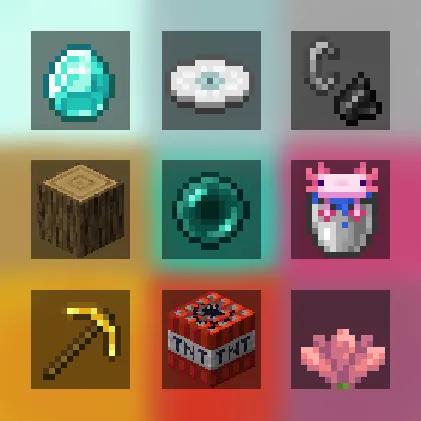
Bingo Game Data Pack
Your goal is to collect certain items as quickly as possible and complete the Bingo card. The team that completes the task first will win.
Different versions of Bingo are designed for specific versions of Vanilla Minecraft Java Edition. Make sure you are using the correct version of the game for compatibility.
⚠️ Important: This data pack requires an accompanying resource pack to function properly. Please make sure it is installed!Installation Guide for Data Pack & Resource Pack
Select and Download
Decide which version of the game you want to play, and then download the Data Pack (DP) and Resource Pack (RP) corresponding to your chosen version.
Download
- Find the Minecraft Bingo page on Modrinth.
- Select the “Versions” tab.
- Click on the name of the version you want to download.
- At the bottom of the page, you will find the data package file and resource package file you need.
- Download both files
Downloading Guide for the Data Pack & Resource Pack
Data Pack Installation:
1. To install the Data Pack in a new world:
- Open Minecraft, go to Singleplayer > Create New World.
- Click on the More button, then Data Packs.
- Select Open Pack Folder and move the downloaded Data Pack file into this folder.
2. To add the Data Pack to an existing world:
- Open Minecraft, go to Singleplayer, select the world you want, and click on Edit.
- Open the World Folder, then go to the datapacks folder.
- Move the downloaded Data Pack file here.
- ⚠️ Warning: Adding the Data Pack to an existing world may impact your current gameplay. This includes potential changes such as the deletion of achievements and modifications to your inventory. Ensure you understand how the Data Pack works to avoid any unintended consequences or loss of progress.
3. Reload if Necessary
Use the /reload command in-game if needed to activate the Data Pack.
Resource Pack Installation:
- Open Minecraft and go to Options > Resource Packs > Open Pack Folder.
- Move the downloaded Resource Pack file here.
- Go back to Minecraft, select the Resource Pack, and activate it.
How to Play
Once you've installed everything you need, you can play alone or gather players for a group game - it's all up to you!
To start the game, enter the command /trigger .bingo.start. Once initiated, each player will have the opportunity to select their team.
Team Selection:
You can join any team, and there are no limits to the number of players in each team. You can play solo, team up with friends, or create multiple teams—it's all your choice.
Discuss Configuration:
It's advisable to discuss the game setup with other participants before starting. The rules are flexible, allowing you to customize the game to your liking, as long as all players agree.
Game Modes:
Line: Collect one row of items on the card. It can be a horizontal, vertical line or diagonal (5 items).
Cross: Collect two intersecting rows of objects, forming a cross. These can be horizontal and vertical lines or intersecting diagonals (9 items).
Full House: Collect all the items on the card to win.
Difficulty levels:
Standard: Recommended level for most players. All items are easily accessible and are only found in the Overworld, making the game comfortable.
Difficult: Increased difficulty. To win, you must collect items not only from the Overworld, but also from the Nether, which makes the task more difficult.
Hard: The most challenging mode. You will have to mine rare and hard-to-find items from the Overworld, the Nether, and the End.
Command
Description
/trigger .bingo.start Use this command to start the game. After entering it, the game will start immediately and you will be able to start completing the goals. /trigger .bingo.leave.game Use this command if you need to exit the game. It will allow you to leave the current Bingo game. /trigger .bingo.settings This command allows you to adjust the visibility of the timer and the position of the list of items. For a comfortable game, it is recommended to use this command to customize the interface to your preferences. /trigger .bingo.rules This command will show you the rules of the game. Use it if you want to quickly familiarize yourself with the basic rules and objectives of the game before starting.Translation
- Chinese (Simplified)
- English (UK)
- English (USA)
- French
- German
- Italian
- Japanese
- Portuguese (Brazil)
- Russian
- Spanish
- Ukrainian
Credits and Resources
- Original Idea by lorgon111
- Negative Space Font - GitHub Repository
- No Shadow - GitHub Repository
Enjoy the game!
本站是资源分享站,资源均来自于互联网和用户自发分享,仅供学习和交流使用。如有版权问题,请联系管理员删除。
操作
创作者
待认领资源
成为此资源的创作者
其他链接
最近更新资源
假面骑士冒险
热度 3667 | 2 天前更新
天空开拓者:耕云纪元
热度 156 | 2 天前更新
火影之旅
热度 224 | 2 天前更新
直至永恒
热度 149 | 2 天前更新
ATM10:空岛 - All the Mods 10: To the Sky
热度 708 | 2 天前更新
植物大战僵尸+ - Plants vs. Zombies+
热度 605 | 2 天前更新
石头世界4 FTB StoneBlock 4
热度 4572 | 2 天前更新
奇妙商店物语
热度 598 | 2 天前更新
阿卡迪亚的天启:天选之歌
热度 335 | 1 周前更新
虚饰作品-Fictional
热度 4523 | 1 周前更新
机械动力:工业与牧歌 - Create: Industry and Pastoral
热度 4315 | 1 周前更新
通天之路
热度 2671 | 1 周前更新
评论区 (0)
登录 后才能发表评论
快来发表第一条评论吧!